
The larger a business gets, the more it needs a reliable, robust, and efficient website to keep up with increasing traffic and customer demands.
With this in mind, is WordPress a good content management system (CMS) for business websites?
The answer’s yes!
WordPress is extremely customizable, focused on security, and trusted by over 40% of the web. In fact, we recommend WordPress for small businesses and enterprises alike.
Below, we explain why WordPress is great for medium-to-large businesses, explore the platform’s pros and cons, compare it to competitors, and outline the best way to get started.
Yes, WordPress is Good for Large Business Websites
WordPress is great for large business websites because it’s scalable and easy to customize, it offers enterprise-grade security, and it’s highly cost-effective.
Its massive software ecosystem makes it easy to add and remove features, and with the right plugin, managing your search engine optimization (SEO) is a breeze.
That said, WordPress requires a lot of regular care and attention through proactive maintenance. It’s easy to get started, but as your needs change and your business grows, the CMS becomes less “plug-and-play” – meaning it’s worth asking for help from experts to make the most of it.
Real‑world proof from successful WordPress enterprise websites
Here are two excellent enterprise websites that show the potential of WordPress for larger firms.
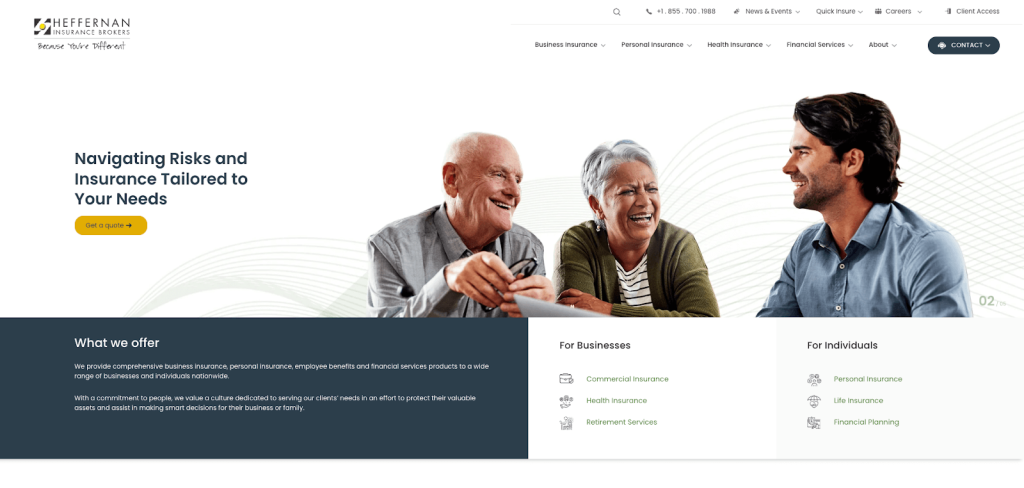
Thanks to its flexible build, StateWP helps Heffernan Insurance Brokers maintain scores of pages and guides for specialized coverage areas as part of an ever-growing knowledge base.
Jimerson Birr
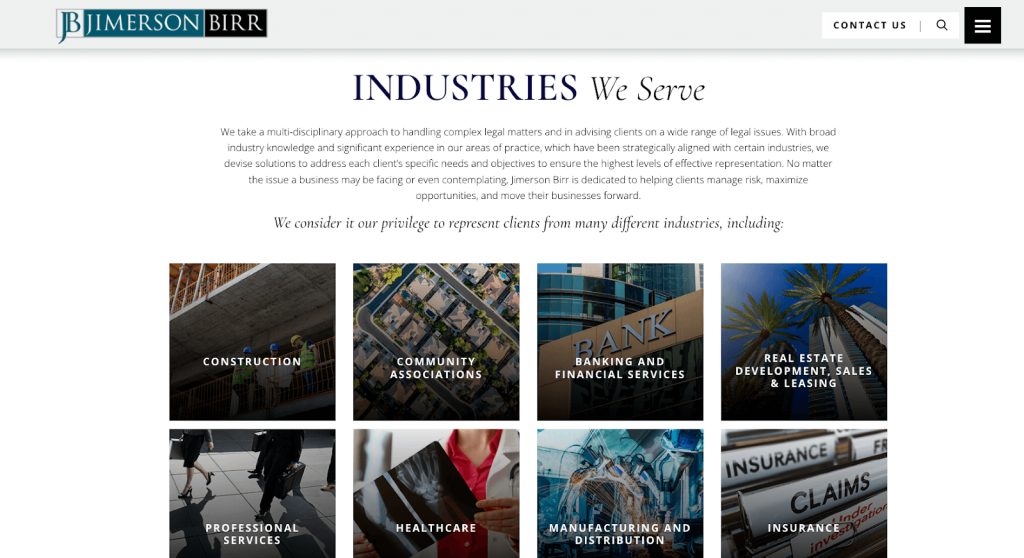
With a statewide presence, Jimerson Birr relies on WordPress and StateWP to present a content-packed knowledge base that’s fully optimized for SEO, allowing it to rank highly in niche searches and drive leads to the sales team.
5 Pros of WordPress for Medium and Large Businesses
The biggest advantages of WordPress for larger firms include:
- Potential cost-effectiveness
- Superb SEO
- Immense scalability and support
- Enterprise-level security
- Options for multilingual and multisite functionality
Let’s break these down.
1. WordPress can be very cost-effective
Larger firms may have bigger budgets, but they’re still discerning about how to build and maintain their websites.
Compared to the cost of maintaining a unique, custom-developed website, WordPress delivers a solid return on investment. It’s free to use the .org version, and the .com version is competitively priced with WordPress business plans.
However, WordPress sites are only truly cost-effective when expert human developers create them according to design best practices and maintain them regularly.
Without expert maintenance and performance management, even the best sites are doomed to lose page speed and develop security issues with time, ruining the user experience and potentially harming reputation and revenue. The good news is that the cost of WordPress maintenance pays for itself in the long run.
2. WordPress is great for SEO
Even the biggest companies need to compete for clicks, and a solid SEO strategy helps keep your brand ranking highly in organic search. It’s even more important in the age of AI, where automated overviews displace traditional search results on Google and limit websites’ opportunities to build their brand and receive organic traffic.
That said, managing SEO – from content optimization to technical tweaks – is time-consuming and often confusing for anyone who isn’t an expert.
Thankfully, WordPress’s SEO plugins, such as Yoast SEO and Rank Math, and advanced analytical tools help users implement best practices and carefully measure their results over time.
It’s a great idea to budget for SEO experts who can support your internal team with technical checks, content creation, and long-term, sustainable lead building.
3. WordPress offers immense scalability and support
WordPress’s ecosystem offers incredible scalability, with premium and bespoke plugins empowering big business owners to uniquely customize their sites.
This is largely thanks to WordPress being open source, which means it’s wide open for developers to constantly find new ways to build on the core platform and to develop unique new plugin solutions.
Unlike some site builders and content management systems, the WordPress CMS doesn’t confine users to restrictive templates and default settings. You can pretty much build whatever your customers need, and there’s always a developer in the community who can help your internal team in a pinch.
WordPress also integrates seamlessly with thousands of enterprise platforms, such as HubSpot and Salesforce, meaning it’s easy to link your site to internal workflows and processes with APIs.
Plus, you can rest assured that WordPress will endure for years to come. It’s used by more than 40% of all websites globally, so it’s not going away anytime soon.
4. Enterprise-level security as standard
Securing WordPress is a never-ending process, but that doesn’t mean the CMS is insecure by default. It’s ready to go with multi-factor authentication protocols (MFA), security certificate management, advanced site monitoring, and user profile/role and access control toggles.
You can enhance a site’s security with enterprise-grade malware scanning and removal using WordPress plugins such as Sucuri and reliable data backups with UpdraftPlus.
However, all of this relies on how you configure your WordPress dashboard. You need to update and maintain your security settings regularly to keep on top of the latest threats. WordPress’s developers regularly patch the platform so it’s protected, but you need to do the legwork to reconfigure and update it.
5. It’s simple to set up multiple websites in different languages and niches
Launching a new brand and need a separate site? Or maybe want to build a specific site for an international market?
WordPress has you covered in both scenarios. With WordPress Multisite, you can create multiple websites under one installation; there’s no need to reinvent the wheel every time you want to add a site to your network.
Having a reliable maintenance partner makes this task even simpler.
For example, we help our client Sun Pacific use WordPress to carefully manage several sites at once, including its main site and its Cuties and Mighties offshoots (with the added benefit of a multisite rebate to reduce costs). As marketing manager Emma Wollenweber states, the StateWP partnership simplifies all aspects of the brand’s ongoing website development:
“StateWP speaks to me in simple English, and using Proto’s Requests portal means I have a direct line to developers rather than a long email conversation. Just the ability to communicate with the person managing our website is HUGE.”
4 Cons of WordPress for Medium and Large Businesses
Alas, there are some downsides to larger firms using WordPress, including:
- Intensive regular maintenance requirements
- Major potential security risks
- Power and efficiency are dependent on your host
- Need for custom code (due to enterprise demands)
Here’s a deeper dive.
1. WordPress needs regular maintenance and updates
You only need to peek at our WordPress maintenance checklist to see just how much maintenance the average WP site demands.
If you don’t update and maintain your site regularly, it’ll slow down, develop security issues, and become harder for people to use.
Regardless of how large your business is, can you really put customer experience and data security at risk?
Plus, think about your content approval process. If you’re a big fish, there are probably plenty of people who need to approve any site changes you make. You can’t just take your site down and keep visitors waiting until your edits are good to go.
Thankfully, there’s a way around this: staging sites, which are scratchpads site owners use to test new features without affecting live content. It’s a core feature of StateWP’s Elite plan, along with access to a maintenance team updating and monitoring your site around the clock.
2. WordPress is prone to security risks
There are many common WordPress security issues. The good news is that the vast majority of these security vulnerabilities are easy to protect against and bounce back from, but only if you have an expert team behind you.
As mentioned, WordPress needs constant vigilance. What’s more, you can’t just delegate WordPress security to anyone. You need to hire an experienced developer or security expert who knows how to secure this type of site effectively.
It’s something CAL Insurance realized early on. It needed a maintenance team to patch up its website, monitor its perimeter 24/7, and help it bounce back should anything go wrong. After leaving its old provider, the firm partnered with StateWP and now benefits from round-the-clock protection and updates installed as soon as they’re rolled out.
3. WordPress is only powerful (and useful) with the right host
A WordPress web property is only powerful and reliable when it’s backed by secure, efficient hosting services.
Unfortunately, even large business owners lean towards cheap, shared hosting solutions. These options put sites at risk of slowdowns and security breaches because they share connections with multiple other sites, sapping bandwidth and potentially leaving open doors to hackers.
Thankfully, you don’t have to split an atom to find a reliable host. You just need managed WordPress hosting from a proven provider (like SiteGround or StateWP) that keeps your server private and exclusive, backs up your data, and prioritizes your security and uptime. Quality hosts know how to get the best out of WordPress with minimal effort.
4. WordPress might not fit all enterprise needs
Unlike Sitecore, a WordPress alternative, WordPress isn’t built specifically for enterprises and doesn’t come pre-installed with all the bells and whistles you might need.
This means that larger firms often need custom website coding to complement their WordPress website builder. Luckily, WP is flexible enough to allow business owners to create truly unique website experiences, user controls, and security protocols.
Plus, there’s no risk of plugin limitations. The sky’s the limit with how many workflows and stack tools they can integrate.
That said, custom development can get expensive, so it’s something to budget for before beginning your journey with WordPress.
WordPress vs. Other Platforms: An Enterprise Perspective
Here’s a quick comparison of WordPress and four rival services enterprises use to build and maintain websites.
| WordPress | Webflow | Drupal | Shopify | Custom CMS | |
| Pros |
|
|
|
|
|
| Cons |
|
|
|
|
|
| Monthly cost | $0 to $25,000/year | $0 to $39/mo + add-ons | CMS is free | From $29/mo | Has no upper limit |
| Best for |
|
|
|
|
|
When To Pick WordPress For Business Sites
WordPress is a great fit for businesses that need advanced features, control over content, and more potential for scalability than many platforms can provide.
It’s also a great choice if you’re on a budget but are still willing to invest upfront in a good host, custom coding, and long-term maintenance. You need to be well aware that WordPress demands this investment if you want to get the best out of it.
WordPress is ideal for companies that want to build content libraries, streamline inventory management for eCommerce, and compete strongly in organic search. It’s the best-in-class CMS for content publishing and management, and its tools and features are intuitively designed for non-technical users.
We also recommend WordPress to business owners looking to integrate and customize existing platforms, such as connecting in-house email automation and customer relationship management (CRM) software.
Services such as WooCommerce also help enterprises launch eCommerce websites from scratch, integrate secure payment gateways, and maintain fully fledged online stores.
Finally, if you realize you need multiple sites due to brand growth and diversification, few options are as flexible and easy to budget for as WordPress.
Choosing WordPress for Enterprise? You Need WordPress Security and Maintenance with StateWP
We can’t stress this enough: WordPress only works properly if you maintain it regularly.
Poorly maintained websites do more damage to larger businesses than you might realize. Slow loading pages, frustrating errors, and navigational issues are great at convincing visitors to go elsewhere.
Plus, getting hacked and leaking data? That’s a world of legal and financial trouble you don’t want knocking at your door.
However, when you have an ever-expanding business to take care of, you’re too focused (and rightly so) on keeping your company afloat.
Our CEO, Garrett, puts it best:
“We work with billion-dollar businesses that have internal teams… Although they may have the skill set to maintain the website, it’s not their primary objective. That means if they’re spending time on their website, they’re not spending time somewhere else.”
To make sure your monthly WordPress maintenance tasks are taken care of and that your site is secure and performing at its best, you need an expert partner at the wheel.
That’s us, StateWP!
Our Elite plan is the top enterprise choice for hands-off security monitoring, feature testing, WordPress website development, and support for eCommerce platforms. It offers:
- 24/7 security monitoring and error support
- SEO auditing and editing on demand
- Google Search Console and Google Analytics integration
- Advanced performance tweaks to support large traffic demands
- Full staging site access
- Direct access to a dedicated manager
Costero Brokers, a StateWP client, benefits massively from our regular maintenance support. This growing firm reduces risk and eases the strain on its internal teams by delegating updates, monitoring, and optimization, while using a staging site to handle edits in a way that doesn’t disrupt site traffic.
Want to follow Costero’s lead? Start with a free online audit to see how much of a difference outsourcing your maintenance can make to your business.
From there, book a chat with Garrett, and let’s build an action plan to keep your website secure, efficient, and pulling in customers.
Is WordPress Good For Business Websites? FAQs
Is WordPress good for a business website that’s on the larger side? What should you look for when choosing a CMS? Let’s find out the answers to these questions and more…
Is WordPress suitable for large sites?
Yes, WordPress is ideal for large sites and complex demands. However, the larger and more complex a site is, the more maintenance and monitoring it needs.
WordPress maintenance entails weekly, monthly, and annual checks to ensure a site is running smoothly and keeping its users safe. Partnering with a maintenance expert offers the best value to owners of large sites.
Is WordPress good for professional websites?
WordPress can be great for professional websites thanks to its high customization potential, huge software ecosystem, and focus on security and SEO.
However, it isn’t a plug-and-play platform, and it does come with a learning curve. Therefore, most professional website owners prefer to outsource to WordPress experts to take care of the nitty-gritty.
What are the key features to consider when selecting a CMS?
- Pricing and maintenance costs (upfront plan charges and demands on your time)
- Ease of use (is it plug-and-play or do you need special training?)
- SEO features and friendliness
- Software integrations (does it connect with your existing setup?)
- Business needs alignment
- Scalability
- Autonomy (does it require lots of attention?)
- Support community and available documentation
What are the disadvantages of WordPress?
- Security risks (if left unchecked for long periods)
- Requires lots of maintenance
- Not plug-and-play (you may need to take time to learn it)
- Has some limitations for the biggest businesses
- Plugins and themes increase memory load and attack surface
- Can be expensive if not maintained effectively (your best value choice is to hire a website maintenance company)
How do I choose a host for my company’s site?
When choosing a host for your company’s site, look beyond the basics, like domain names, SSL certificates, and professional email. Search for a reputable, well-reviewed website hosting service with evidence of high uptime, private server plans, data backup services, room for growth, on-demand support, and user dashboards. You should also choose a host that keeps billing simple, offers tons of data storage, and helps with self-hosted WordPress.
Our Premium hosting (included in our Premium and Elite plans and just $32/mo for Starter clients) is an excellent choice with 99.9%+ guaranteed uptime.