
Your WordPress site just broke. It’s not the first time, either. Maybe it’s a white screen of death, a critical error message, or some plugin update that threw everything off.
You’ve spent the last hour searching for solutions, digging through outdated forums, and trying fixes that only made things worse.
Stop wasting time on endless troubleshooting.
Instead, let’s walk through five ways to get help with WordPress sites. From DIY fixes to expert support, these solutions will ensure your site runs smoothly so you can focus on your business objectives and never panic again.
How To Get Help With WordPress Websites: 5 Options
When your website runs into issues, you have a few ways to find support – some faster and more reliable than others.
You could search WordPress support forums, reach out to a plugin or theme developer, or ask your hosting service provider for help. Still, if you need help with WordPress problems ASAP, these options don’t guarantee it.
Let’s explore what you can do when you need help with WordPress websites and break down the pros and cons of each option.
If you want the fastest, most reliable strategy to solve WordPress problems, skip to the last option – professional support that handles everything for you.
1. Use our StateWP blog to find a guide to fixing your error
When something goes wrong with your WordPress site, your first instinct is likely to research the issue online. Unfortunately, search results have been a train wreck lately. Many lead you to outdated forums, technical jargon you don’t understand, or AI-generated advice that doesn’t even make sense half the time.
Instead, you can visit the StateWP’s blog, where we’ve built a library of in-depth, easy-to-follow guides covering common WordPress issues, plugin errors, security concerns, and performance fixes.
Our blog posts are easy to navigate. The blog features a search bar, and allows filtering by category, so you can always quickly find the exact troubleshooting guide you need.

For example, let’s say you encounter one of the most common WordPress problems – plugin conflicts. You update a plugin, and suddenly, your site crashes. You try rolling it back, and nothing happens. All of a sudden, you’re stuck.

Instead of guessing your way through a fix, you can use StateWP guides to handle plugin issues quickly and safely:
👉 How to Update WordPress Plugins Manually
👉 How to Fix WordPress Plugin Conflicts
👉 How to Fix a Failed WordPress Plugin Update
These guides walk you through the exact steps to troubleshoot and fix plugin-related issues without breaking your site. They offer clear instructions, so you always have complete control over your website.
Jimerson Birr, a Florida-based law firm, learned firsthand how frustrating it can be to lack that control.
Its website and domain were locked behind its previous maintenance agency, which meant it couldn’t make simple updates or fixes without waiting for someone else’s input. Every time the firm needed a change, it had to submit a request and hope it got done in time, without affecting user experience.
When Jimerson Birr switched to StateWP, we migrated its website with zero downtime, gave the development team full access to their accounts, and removed their digital handcuffs. Now, instead of feeling helpless when an issue pops up, the firm has the best of both worlds:
- Full control over the WordPress site
- Guidance and expert support when the team doesn’t want to DIY
- Ongoing security and performance monitoring so small issues don’t turn into big problems
- No more waiting, no more roadblocks, and no more scrambling for help
2. Check out the official forums for more guidance
If you need help with your WordPress website, the official WordPress forums are one of the first places you can turn to. These community-driven forums have been around for years but are still as active as ever.

The good news? There’s a chance your exact issue has already been solved. The bad news? Finding a reliable answer isn’t always easy.
If you want to get help with WordPress sites via the forums, here’s how to increase your chances of getting a useful response:
- Search before posting: Someone has probably had the same issue before, so always search the forums before starting a new thread.
- Be specific: If you create a new post, describe the issue clearly, including your WordPress version, hosting provider, theme, and plugins.
- Check who’s answering: Responses come from volunteers, not official WordPress staff. While some are technical experts, others might offer misleading or outdated advice.
- Be patient: Responses can take hours or even days, and you’ll not get a guaranteed fix.
Although forums can be helpful for general guidance, they’re not always practical for business owners who need quick solutions.
For example, let’s assume your WordPress site suddenly crashes after a theme update. You post on the forums asking for help and get a few responses:
- “Try deactivating all your plugins and see what happens.”
- “Maybe it’s a caching issue. Clear your cache.”
- “Switch to a default theme and see if that fixes it.”
With so many possible solutions, how do you know which one to try first? Without expert WordPress help and guidance, you could waste hours testing fixes that don’t even apply to your situation.
3. Reach out to the plugin or theme developer
If you suspect a plugin is causing issues on your site, the best people to ask for help are the plugin developers who built it. They know their code inside and out and can often provide the fastest, most accurate solution.
There are two ways to contact a developer for support:
- Through the WordPress.org support forum
- Directly on the developer’s website
If you’re using a free plugin or theme, the WordPress.org support forum is usually your best option. Each plugin and theme in the repository has a dedicated support section, where users post issues and developers (or community members) respond.
- Go to the WordPress plugin directory or theme directory
- Search for the plugin or theme name
- Click on “Support” in the menu
- Search for existing answers or make a new thread
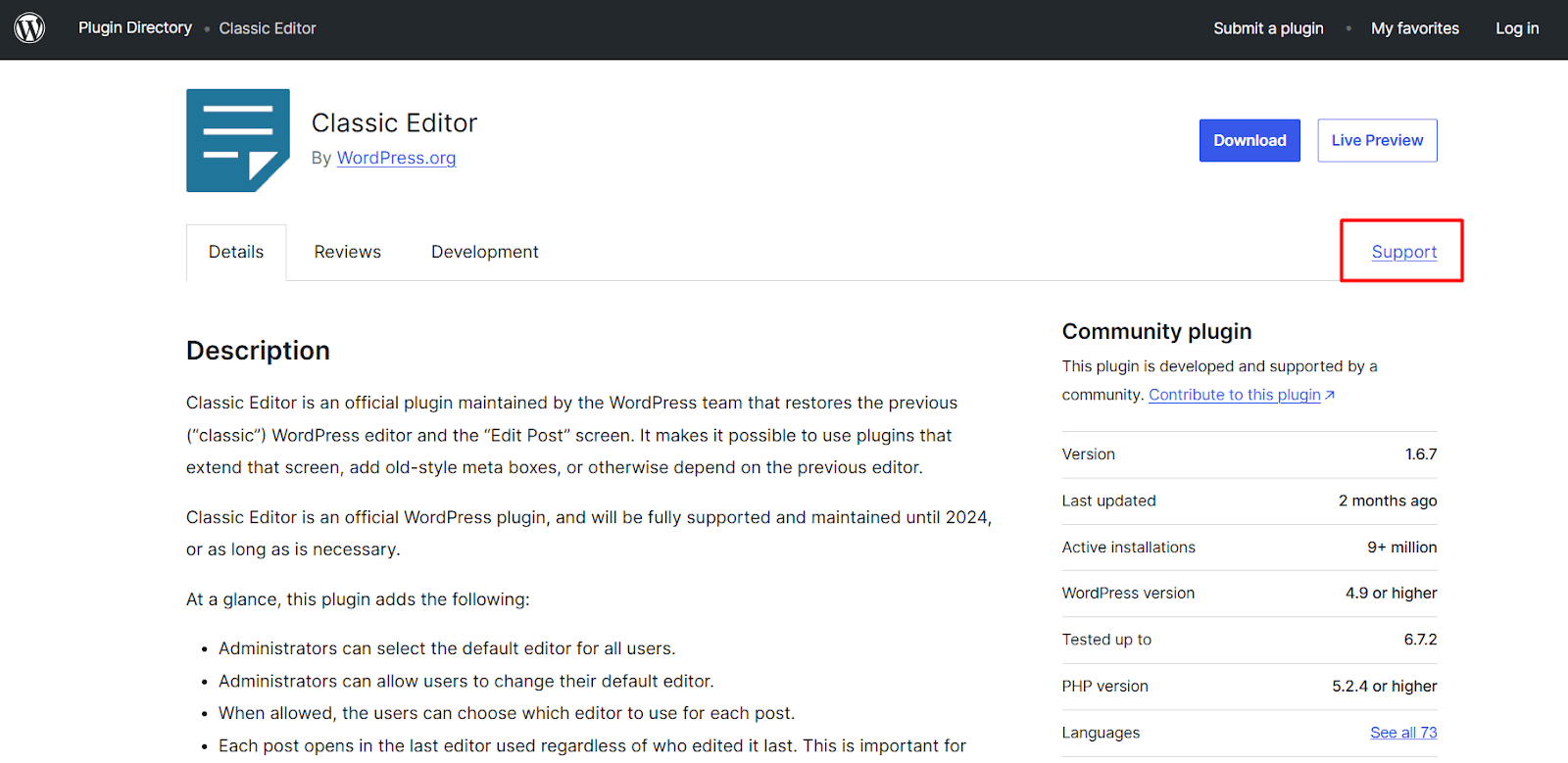
While this can work for minor bugs or questions, remember:
- Developers are not required to answer because many free plugins don’t offer official support.
- Response times vary (some developers reply in hours, others never).
- Solutions may be generic, and you might get a copy-paste answer that doesn’t fix your issue.
If you’ve paid for a premium plugin or theme, you should have access to direct developer support – usually through a help desk, live chat, or email ticket system.
To find the right contact method:
- Google the plugin/theme’s name
- Visit the official website
- Look for a “Support” or “Help” section
- Check if they have preferred contact channels or a priority support plan
Premium developers typically respond faster and offer more detailed troubleshooting than free forum support. However, there are still downsides:
- Some developers charge extra for support (even after you’ve purchased the product).
- You may have to wait days for a response, which doesn’t work with urgent site issues.
- Support is limited to their product, so if a plugin conflict or hosting problem causes an issue, they won’t help.
When your site is down, waiting for a response isn’t an option. That’s why many WordPress users turn to managed website maintenance services like StateWP instead.

Need More Than Developer Support?
If you’re looking for hands-on help with updates, troubleshooting, and ongoing maintenance, StateWP’s WordPress website management services are the right fit.
[Explore WordPress Website Management Services]
4. Ask your host for help (or WordPress.com if you’re a WordPress.com user)
Your web hosting provider is another potential source of support when your WordPress site runs into issues. Many hosting companies offer basic troubleshooting and can help with server-related problems, downtime, and certain WordPress errors that affect the user experience.
If you’re using WordPress.com, support options depend on your plan. Free users have to rely on community forums, while paid plans include live chat and priority support.
Most managed WordPress hosts offer support for:
- Server-related issues (downtime, slow performance, database errors)
- SSL certificates and security settings
- Restoring daily backups (if included in your hosting plan)
- Basic WordPress troubleshooting
However, hosting support has major limitations:
- No plugin fixes or resolving theme conflicts
- No performance optimization
- Hosting support teams are often overloaded
For example, if your website suddenly goes down, your host might be able to restore a backup, but they won’t diagnose what caused the issue. If the problem is a plugin conflict, malware, or bloated code, you’ll be left to figure it out. And, without a real fix, it may happen again.
5. Get professional help with WordPress website maintenance services
At some point, troubleshooting WordPress issues on your own stops making sense. You get tired of dealing with plugin conflicts, security threats, or slow performance. The time spent searching for fixes and patching problems takes away from running your business.
Smart business owners hand off their website headaches to experts who keep things running smoothly 24/7. And that’s exactly what StateWP does best.
We’re not just another WordPress design agency that runs automatic updates and calls it a day. We take a hands-on, proactive approach by offering specialized services like managing your site’s security, performance, and reliability.
Here’s what makes our WordPress care plans a one-and-done service:
- Your website stays online and fast with 99.9%+ uptime when you use our premium hosting service or a recommended partner.
- A dedicated account manager handles your requests personally instead of sending you through a ticketing maze.
- We monitor your site 24/7 and fix issues before they affect your business so you never wake up to a broken website.
- Our 100% security record means your site stays safe from hackers with industry-leading security measures and firewall protection.
- Proto, our all-in-one dashboard, gives you full visibility into your site’s performance and security so you’re always in control.
- We handle all support requests within one business day (usually much quicker).
Instead of putting out website fires, StateWP ensures your site is always secure, fast, and reliable.
That’s exactly what Ranchod Law Group needed when it came to us with a slow, outdated website full of security risks and plugin issues. The company had no structured routine maintenance plan, which made updates and troubleshooting a constant struggle.
We migrated the hosting services, updated 35 plugins and eight themes, improved the website’s performance, and achieved a speed optimization score of 94 (from 38).
Now, instead of dealing with constant WordPress headaches, our customer can submit a request, and our expert team will handle it in under one business day. No more frantically searching for: “How to get help with my WordPress website?!”
In the words of another one of our clients, Blaine Verde:
“Their support is fast and it’s nice having experts like them in our corner. Our maintenance dashboard and ticketing system is like nothing we’ve seen before and it’s made us really confident that our site is up to date and performing well.”
We use our 15+ years of WordPress technical expertise to ensure your website is optimized, secured, and monitored around the clock. As a result, you never have to waste time on troubleshooting and DIY fixes.
Get a free website audit to uncover performance issues, security risks, and hidden problems before they cost you business.
Choose the Best Way to Get WordPress Help
A slow and glitchy website with weak security is a ticking time bomb. One bad plugin update, a hacking issue, or a random crash, and suddenly, your business is in damage control mode.
Keeping your site reliable takes regular updates, smart security monitoring, and someone who knows what they’re doing. You could handle it yourself, but do you want to spend your time troubleshooting errors or growing your business?
We know what you answered. Do yourself a favor: partner with a dedicated team of experts that keeps your site running smoothly so you never have to think about it again.
With StateWP, your site is managed by a skilled team that knows WordPress inside and out. We’ve rescued hundreds of websites from security threats, performance issues, and frustrating slowdowns. Yours can be next.
Start with a free audit to learn what your site needs, with zero commitment.
Then, spend twenty minutes speaking with Garrett, and he’ll help you pick the right maintenance plan and kick off the onboarding process! 🧘
Help With WordPress Sites: FAQs
Still have questions about the best way to get WordPress support? Here are quick answers to some of the most common issues.
Can I contact WordPress.org for support?
No, WordPress.org does not provide direct email or phone support. However, users can seek help through the WordPress.org support forums, browse official documentation like WordPress Codex and HelpHub, or contact the developer of a specific theme or plugin for assistance.
Community groups and online tutorials may also provide additional guidance for troubleshooting WordPress issues.
When should I hire professional WordPress help?
You should hire a dedicated support team to provide WordPress help when persistent technical issues, security risks, or lack of time make it difficult to manage your website.
Complex sites powered by WordPress experience an average of 94 attacks daily, according to a SiteLock Security Review. So, if your site faces frequent crashes, slow performance, or security threats, expert assistance can prevent downtime and protect your data.
Why should I hire professional WordPress help?
Hiring a professional WordPress expert team ensures your website stays secure, fast, and reliable without encountering complex issues or requiring constant troubleshooting from your side. Even a one-second delay in loading time can lower conversion rates by up to 20%.
Service providers can handle security updates and patches and performance optimization, which prevent issues before they disrupt your business.
What’s the best way to reach out to plugin and theme developers?
For free plugins and themes, visit the WordPress.org forums and post a request on the developer’s page. For premium products, check the developer’s website for a dedicated support portal, help desk, or email contact.
How do you clean a WordPress site of malware?
To remove malware from your WordPress site:
- Back up your WordPress site to restore if needed.
- Scan for malware using a security plugin.
- Remove infected plugins and themes and reinstall clean versions.
- Delete malicious files from WordPress core and database.
- Reset all passwords.
- Update WordPress, themes, and plugins for security.
- Enable a firewall to protect your WordPress site.