
WordPress is flexible, scalable, and customizable, making it an excellent choice for eCommerce businesses that need to adapt frequently to customers’ needs.
However, it can also be a significant time drain, a tricky platform to learn, and a sunk cost if not managed effectively.
So, is WordPress good for eCommerce sites? Yes, provided you have professional maintenance and security to fall back on!
With more than 50 eCommerce sites in our portfolio, we’re the right experts to help answer this question (and get your online storefronts thriving on WordPress).
Below, we:
- Explore why and how the WordPress content management system is a game-changer for online retail
- Compare different e-Commerce solutions
- Show you how to get started with WordPress for eCommerce – properly
|
TL;DR – Key Takeaways
To make the most out of eCommerce for WordPress, partner with StateWP’s expert developers and spend more time running your business. |
7 Pros of WordPress for eCommerce Sites
The biggest WordPress eCommerce perks include:
- Tons of build flexibility
- Near-infinite scalability
- Superb technical SEO support
- A huge development community
- Cost-effective if used properly
- An excellent software ecosystem
- Complete control with an open platform
Let’s dive into these pros in more detail.
1. Tons of build flexibility
The content management system (CMS) is impressively easy to customize at the start, with templated WordPress themes, movable widgets, and custom layouts and functions.
Plus, because it’s open source, WordPress developers worldwide are constantly building and improving the core software as well as eCommerce plugins and themes.
Many store owners praise WooCommerce, the online retail platform for WordPress, for its amazing customization potential. As your site grows, you can add content, functionality, and third-party integrations as you need.
WooCommerce is super-flexible, but there are other providers (like BigCommerce, WP EasyCart, and MemberPress) worth comparing on costs and features.
2. Near-infinite scalability
WordPress doesn’t restrict your inventory management behind higher fees. And you’re also free to build content libraries, swap out plugins, change hosts, and design new pages to improve user experience.
Put simply, with WordPress, you can create whatever your customers need.
It’s easy to see this scalability on Nutsite. Partnering with us, this snack retailer has built and maintained an attractive, high-conversion store with a vast catalog of products.
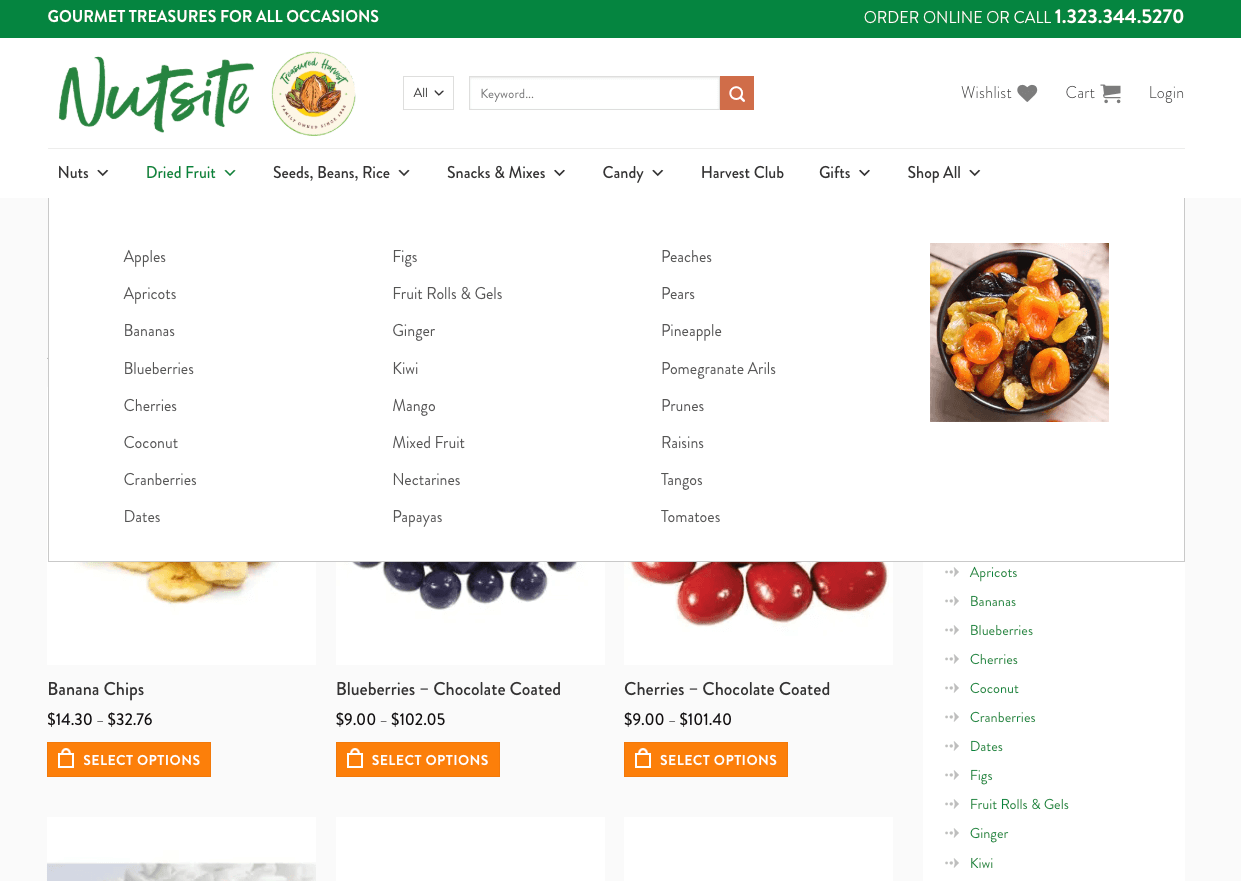
Tip: To support a large webshop, you should always remember to optimize the site’s speed, update security plugins, and add content to appeal to new visitors and existing customers alike. We take care of this behind the scenes for Nutsite. 😉
3. Superb technical SEO support
Good search engine optimization helps boost your visibility in Google search result pages and AI-powered conversations on the likes of ChatGPT and Perplexity.
However, navigating technical SEO and GEO (SEO for AI chatbots) can be complex, confusing, and time-consuming.
Luckily, several SEO plugins for WordPress, such as Yoast SEO, break down even the most technical checks and measures so you can get found faster. In this respect, WordPress is superior to other eCommerce platforms, which only tend to tackle the basics and force you to follow fixed checklists.
That said, technical best practices are just the starting point. WordPress websites require more SEO expertise and effort, so we recommend you:
- Invest enough time and thought into planning and executing your content strategy, or
- Partner with SEO and content specialists, who can take you beyond technical checks and unlock better results through a unified narrative and consistent publishing
4. Huge development community
WordPress’s open-source platform has empowered thousands of creative developers to build and share tools to help people customize their online storefronts.
This large (and growing) community of WordPress devs means there’s always someone who can help with problems like optimizing navigation, choosing the best payment gateways, and developing custom solutions for plugins.
However, don’t expect a long-term relationship or complete fixes from freelancers – specialized maintenance companies are best placed to give you that level of peace of mind.
5. Cost-effective if used properly
WordPress (from WordPress.org) is free to use. After you buy a domain and a hosting solution, you can install it via your control panel and get started.
You’re not tied to monthly or yearly contracts like on Wix or Shopify. Plus, you won’t get hit with extra transaction fees beyond what your payment processor charges.
However, WordPress is truly cost-effective when experts build the site using tried-and-tested best practices and then keep up with eCommerce maintenance, security measures, and SEO.
Without solid architecture, regular updates, and performance management, your site will be slow and confusing. It might also be exposed to hackers who steal data and wreck your reputation. Remember that no one wants to entrust their payment data to a sluggish website with lax security.
To reduce ongoing maintenance costs, you need someone to take the reins for you.
That’s what Spark Experiences did with its online commerce site.
The luxury tour company now gets amazing value out of WordPress by delegating maintenance and development updates to StateWP, especially during the busy tourist season. With our affordable monthly maintenance plan, costs are manageable, performance is strong, and security is guaranteed.

6. Excellent software ecosystem
WordPress and WooCommerce are famous for their huge plugin libraries. Among them, there are specialized eCommerce tools for selling recurring products, fine-tuning web forms, processing payments, and prompting abandoned shopping carts. You name it, and it probably already exists.
WooCommerce even helps you arrange shipping options, build product pages, and automatically calculate sales tax for different states and countries.
Still, WordPress isn’t exactly plug-and-play when you compare it to other platforms. Wix and Shopify, admittedly, are its biggest competitors with easier, all-in-one engines.
On the other hand, professionals find WordPress a breeze to manage and customize. They make changes quickly and cost-effectively, protecting your initial savings – all the more reason to partner with WP developers to make the most of this ecosystem.
7. Complete control with an open platform
WordPress gives you complete control and ownership of your data, designs, and store transactions.
Closed platforms, meanwhile, might give more user-friendly experiences, but this is usually at the expense of being locked into their software forever.
WP is a platform that takes time to learn, but you’ve always got the wheel.
For example, it’s relatively easy to restore WP sites from backup solutions and migrate them to a different host. This comes in handy if your current provider’s performance drops off a cliff or becomes unreasonably expensive.
5 Cons of WordPress for eCommerce Businesses
When used poorly, WordPress for eCommerce comes with downsides, such as being:
- Expensive if you do it yourself or build it poorly
- Open to security risks if poorly managed
- At risk of performance issues
- Dependent on regular maintenance and updates
- Infamous for its steep learning curve
1. Expensive if you DIY or build poorly
Adding features, managing website hosting, and arranging for custom development add up in the long run.
You are completely responsible for maintaining your site, and that also means getting everything right, from performance to security.
If you get it wrong, you’re on the hook for further costs. Cheap, low-effort, or misguided website builds lead to errors, scalability problems, and security issues. That translates to losing customer trust and revenue.
For example, you might end up paying for clashing plugins that block abandoned cart recovery notifications, doing far more harm than good.
Key lesson: If you pick WordPress for eCommerce, you need help from a team that understands this CMS inside and out. It’s the only way to stop costs from spiralling out of control down the line.
2. Security risks if poorly managed
WordPress is sadly infamous for its hackability, not because the platform is weak, but because site owners don’t update it properly.
Miss core file and plugin updates, and you give hackers an open goal to exploit your site. WordPress updates keep your store patched with performance and security fixes.
WordPress can also develop security vulnerabilities if:
- Plugins aren’t compatible
- Firewall protection is limited
- You use weak passwords and access controls
- Malware strikes
- SSL certificates don’t work
This means you must frequently monitor and scan your site, even if it’s up-to-date.
An insecure site can lead to breaches, which cause revenue loss and reputational damage. We can’t stress this enough: lethargic website maintenance is expensive!
Instead, follow the example of our client, Foodie Tours, which signed up to fix some initial bugs because they knew serious security issues were around the corner. Once we took the wheel, we started defending its site from malware, errors, and performance issues – leaving them with peace of mind and more time for their clients.
3. Performance risks
If you don’t monitor and update a WordPress site regularly, its performance declines, resulting in slower page loads and poor user experience.
Listen to your customers: Four in ten online shoppers hate slow-loading websites, and at least half leave if you keep them waiting around. Additionally, more than half believe load speeds reflect on your brand quality.
There are numerous ways to speed up a WordPress site, but the key is to maintain that speed for the long haul.
StateWP client Helen Sanderson Associates understands this all too well. The company came to StateWP with an error-riddled site that wasn’t up to scratch, and visitors knew it.
Since joining us, however, HSA’s site performance has increased by 30%, and there have been zero errors because we regularly optimize its speed and constantly monitor its vitals.

“We have been really happy with how easy they are to communicate with and their quick response time. The website speed has improved and the weird ‘bug” issues that used to be common are no longer happening. Proto (their portal) is very cool and informative. It has been a real confidence booster knowing our site is secure, well-maintained, and up to date.”
– Julie Tomlinson, Marketing & Communications, Web manager, Operations
4. Requires regular maintenance and updates
As convenient as WordPress is, its open-source software requires lots of care. Just look at the length of our website maintenance checklist!
Neglecting maintenance puts everything at risk: customer data, site speed and performance, and even its integrity.
Think of your website like your car. Would you expect it to run well if you never take it in for oil changes? As Garrett Goldman, our CEO, puts it:
“We rotate our tires, change the oil in our car… we can technically go a while without doing those things. However, we do know that if you go long enough, things will happen – your security could degrade, your performance will degrade, and the same is true for a WordPress website.”
And yet, the main issue for webshop owners who want to maintain things properly is that they don’t have the time to do it all themselves. There’s an answer for that…
5. Steep learning curve
WordPress seems easy to use, but you need technical know-how to set up a store correctly and profitably.
You must navigate updates and tweak plugins, security features, and access controls. We’ve met plenty of eCommerce business owners who got started with WordPress only to burn out after a few months of tinkering.
Besides, making the right choices is hard if you’re going it alone, armed only with online guides (many of which are biased and trying to sell you a premium plugin). What if you end up locking your site with a common WordPress error?
To get over this learning curve, hire an expert development and maintenance team. They can hold your hand on the difficult tasks and train your staff to handle the easy stuff. That way, you still get all of WP’s benefits with none of the headaches from its technical demands.
It’s a better solution than defecting to a user-friendly platform like Shopify, only to find your creativity and growth stifled by limited customization and control.
WordPress vs. Other Platforms: eCommerce Perspective
Following our WordPress for eCommerce pros and cons, let’s break down how the platform compares to other popular options:
| WordPress | Squarespace | Wix | Shopify | Custom | |
| Pros |
|
|
|
|
|
| Cons |
|
|
|
|
|
| Monthly cost |
|
|
|
|
|
| Best for |
|
|
|
|
|
Our Verdict: WordPress Is Great for eCommerce – If You’re Ready to Maintain Your Site
WordPress can be fantastic for eCommerce. Having managed scores of stores over the years, we’ve seen some big success stories unfold. However, your WordPress eCommerce site can only be successful in the long term if you invest time, money, and effort in running it.
First, you need to hire an expert in eCommerce web design, then you need to think back to Garrett’s car analogy: You can’t ignore website maintenance after your new shop is live. That is, if you want it to perform.
If you don’t budget for an online store’s security, maintenance, and performance, the risks are simply too high to warrant even getting started.
So, the answer is to hire a top developer and a top website maintenance company to take care of all of WordPress’s working parts while you source exciting products and dazzle your customers.

Get Started Today with WordPress eCommerce
It’s time to make WordPress work for your online store, and we want to help.
For brand new webshops, head on over to State Creative, which can help you launch a flexible eCommerce site that’s easy to build upon over the years to come.
If you already have an eCommerce website, that’s where we come in!
We recommend our Elite plan, which is tailored to online storefront owners with dedicated eCommerce development.
Available from $630/mo, Elite has tons of time and cost-saving benefits for eCommerce site owners:
- SEO auditing (to help you reach new customers)
- Round-the-clock site monitoring and edit fixes
- Staging site support (so you can try new features without affecting your live site)
- A dedicated point of contact
- Lightning-quick support in less than a calendar day
Another blessing is that you won’t have to pay for a full website redesign – we can optimize, refresh, and maintain your existing site so it looks and works like new again.
If you’re keen to see what a well-maintained WordPress site looks like in practice, take our free online audit for a detailed breakdown with zero ties.
From there, book a 20-minute call with Garrett and discover how WordPress maintenance support can help you reach your eCommerce goals.
WordPress eCommerce FAQs
Is WordPress good for ecommerce websites? Yes – and here are some related points you should consider to keep your customers happily adding products to their shopping carts.
Does WordPress support eCommerce?
However, as online storefronts grow over time, customized maintenance and support from development agencies are a must. Otherwise, you’re left handling it all yourself, taking time away from your business and potentially losing sales and revenue.
Which platform is best for eCommerce?
Many online store owners use page builders with eCommerce functionality, like Wix, Shopify, and Square, to simplify eCommerce management. However, when used and maintained effectively, WordPress offers unbeatable flexibility, control, and potential.
Unlike some platforms, WordPress gives you complete ownership of your content, in-depth SEO management, features like payment gateways, and no contract ties. It’s best to manage a WordPress eCommerce site with a maintenance agency.
Is Shopify or WordPress better?
Shopify has many benefits for some eCommerce site owners. For example, it’s very easy to use from the get-go and is quick for complete novices to learn. However, compared to WordPress, this eCommerce hosting provider offers limited scalability and customization.
Although WordPress has a slight learning curve, it’s still very user-friendly with developer support by your side.
Is WordPress secure enough for managing and scaling an online store?
Yes, WordPress is certainly secure enough for running and growing eCommerce sites (we’ve managed over 50 of them!). However, you must diligently maintain and update your site or risk it developing errors and becoming obsolete. Partnering with a maintenance agency ensures your online store and customers are always safe and secure.
Is WordPress cost-effective for SMEs launching eCommerce sites?
Therefore, the most cost-effective route is to delegate eCommerce maintenance to a reliable WordPress partner that always has your back.