
Choosing the right website platform is a big deal for small business owners. Time, budget, and customer trust are at stake.
Many small businesses choose WordPress as their content management system. It’s flexible, scalable, and packed with features, but it also comes with a learning curve and security risks.
After working with hundreds of small businesses that use WordPress, we feel we need more nuance than just answering the question, “Is WordPress good for small business?” with a “You bet!”
Below, we discuss the pros and cons, how WordPress compares to other options, and how to make it work for your content marketing needs from day one.
|
TL;DR – Key Takeaways
|
8 Pros of WordPress for Small Businesses
WordPress is the top choice for business owners who want control, flexibility, and fast, SEO-friendly websites without wasting their whole website redesign budget.
Here are eight solid reasons why businesses use WordPress, backed by real-world results from the clients we support every day:
- Low initial investment for high flexibility
- The right fit, no matter your size
- Fast to launch, faster to load
- Great support ecosystem
- Easy search engine optimization
- A massive toolbox of themes and plugins
- Website ownership with no strings attached
- Affordable now, scalable later
Let’s dive in.
Low initial investment for high flexibility
Building a custom site from scratch can get expensive, especially with ongoing changes. WordPress offers a head start with themes, plugins, integrations, and a support ecosystem that can save you thousands in development costs.
At StateWP, we help clients make the most of what they already have. We work within your setup to keep things fast, stable, and secure without the need for a full redevelopment budget to fix bugs, speed up WordPress websites, and optimize for seasonal traffic.
The right fit, no matter your size
WordPress does more than launch a small business WordPress website. This platform can support growing businesses that are expanding service offerings, publishing regular content, or adding WooCommerce functionality and payment gateways down the line.
Take Romano Law, for example.
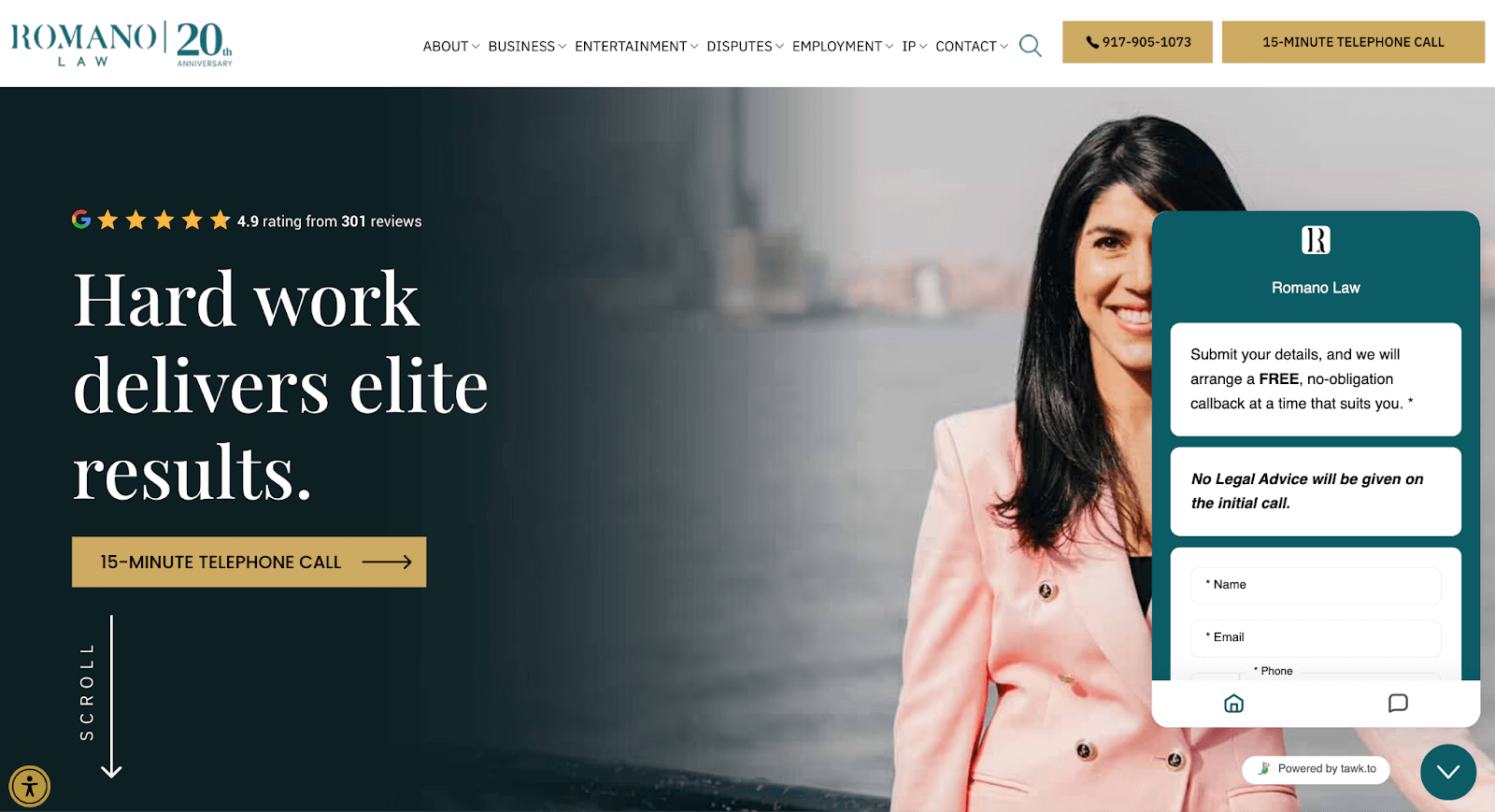
This law office’s site attracts serious traffic and is constantly evolving with new pages, blog posts, chatbots, and media coverage. Because it’s built on WordPress, Romano’s team can publish and update content easily without the help of web developers.
In addition, we work in the background to keep everything secure, optimized, and scalable as the business grows.
Fast to launch, faster to load
WordPress makes it easy to get up and running quickly, and just as importantly, it helps your site stay fast once it’s live.
That matters more than you might think. According to Unbounce, about 70% of people say slow load times affect their buying decisions. If your site takes forever to load, visitors are more likely to click away, never to return.
StateWP helps small businesses improve load times by 25% on average, improve performance scores, and streamline backend systems so your site loads fast and runs smoothly, without waiting in a dev queue for every update.
Great support ecosystem
With WordPress, you’re never stuck reinventing the wheel. The platform’s ecosystem – plugins, themes, and expert help – is enormous. That means faster fixes, more integrations, and lower risk when something goes sideways.
If your team ever needs outside support, you’re not locked into a single developer. It’s an open system with thousands of WordPress experts ready to help.
Easy search engine optimization
WordPress lets you control key SEO factors like meta titles, internal links, image optimization, and site structure. You do not need to code or hire third-party developers.
SEO plugins for WordPress, like Yoast SEO and Rank Math, make it easy to follow best practices. Pair them with fast load times, mobile responsiveness, and clean URLs, and they can give your site a real edge in search.
A massive toolbox of themes and plugins
Need to add a booking system, multilingual support, or an email capture form? There’s a plugin for that. WordPress offers access to more than 59,000 free plugins and thousands of themes, making it one of the most customizable platforms in existence.
Still, having access to a wealth of plugins can also create issues. The key is knowing which tools to trust and how to avoid WordPress plugin conflicts. At StateWP, we help clients sort through the noise, test WordPress plugins for performance issues, and keep everything updated so their site stays fast and secure.
Website ownership with no strings attached
On closed CMS platforms like Squarespace or Wix, you’re renting space on someone else’s system. Sure, it’s convenient at first, but what happens when you want to move, scale, or customize beyond their limits?
With WordPress, you own everything – the domain name, hosting provider, website design, content, and data.
You decide where your site is hosted, how it’s maintained, and who gets access.
Affordable now, scalable later
WordPress can be incredibly cost-effective, but only if you set it up right.
The software itself is free, and there are many budget-friendly WordPress hosting and maintenance options. You’re not tied into expensive plans or custom development just to make basic updates. Plus, you can start simple and then build over time as your needs evolve.
For example, Lamano Law came to us for performance optimization and routine updates.

We improved its site speed (GTMetrix from C to A) and security plugins, and now support the site monthly without the overhead of a full-time web team. That’s professional 24/7 WordPress support at a fraction of the cost.
4 Cons of WordPress for Small Businesses
Without the right setup and support, small business owners can run into frustrating WordPress theme issues and other problems that waste time, drain budgets, and hurt website performance.
Let’s take a look at the four most common downsides of WordPress for small business sites and how to work around them.
- Security risks if unmanaged
- Regular updates and maintenance
- Expensive extra features
- Not plug-and-play
Security risks if unmanaged
Outdated plugins, weak logins, or missed updates can create WordPress security issues that bad actors are quick to exploit. This is especially dangerous for small business websites that don’t have dedicated IT teams.
In fact, 75% of cyberattacks target small businesses, according to the Sophos 2024 Threat Report. A compromised site can lead to lost leads, downtime, or even legal exposure.
Several clients came to StateWP after close calls or major site issues.
For example, CAL Insurance had just fired its old vendor and needed immediate DDoS protection and help for security breaches.
We jumped in, locked things down with Sucuri and other security tools, and even prevented a major outage by catching an unpaid domain issue with our 24-hour monitoring. They’ve been on our Premium Plan ever since and are sleeping easier because of it.
“Absolutely love working with Garrett & his team at StateWP. They are fast to respond and proactive! Plus, super nice & caring. Maybe most importantly, StateWP keeps our WordPress site secure and performing at its highest level. Bottom line, we can rely on StateWP!”
– Joe Delucchi, CEO, CAL Insurance
Requires regular updates and maintenance
Unlike drag-and-drop tools that run on autopilot, WordPress needs regular maintenance. That means plugin and theme updates, performance optimization, backups, and security hardening.
If you skip maintenance, you risk breaking your site, or worse, exposing it to vulnerabilities that affect speed, usability, and even your customers’ data.
We’ve seen this firsthand.
One client came to us with 35 outdated plugins and a completely neglected theme. The site was slow, glitchy, and crashing regularly. Within days of onboarding, we manually updated its plugins, removed bloat, and got the site from a failing GTMetrix grade to an A.
Can get expensive with extra features
WordPress is budget-friendly if you build and manage it the right way. However, if your site needs extras, like booking systems, gated content, or eCommerce features, expect to invest in premium plugins or custom development.
The real cost comes when DIY efforts or cheap builds backfire.
We’ve had clients come to us after hiring a $200/hour freelancer who vanished mid-project or installing a dozen clashing plugins that broke their checkout flow. By the time they called us, they’d already lost leads, time, and trust, but we still managed to save the day.
Not exactly plug-and-play
WordPress can feel overwhelming at first. There’s a dashboard to learn, plugins to configure, auto-updates to manage, and technical choices that impact performance, SEO, and security.
It’s not rocket science, but it’s also not a no-code platform like Wix.
We’ve worked with plenty of small business owners who gave WordPress a shot, got stuck halfway through setup, and ended up with a half-working site gathering digital dust. Others got it live, but never felt confident editing pages, updating content, or dealing with search engine optimization.
Luckily, you don’t need to master WordPress to use it. With the right partner (Psst, that’s us!), you can skip the confusion and get all the benefits without the learning curve.
WordPress vs. Other Platforms: Is WordPress good for small business websites?
Not sure which is the best website platform for small business owners like you?
Here’s a side-by-side look at WordPress, Webflow, Squarespace, Wix, Shopify, and custom development to help you compare costs, features, and fit.
| WordPress | Webflow | Squarespace | Wix | Shopify | Custom | |
| Pros |
|
|
|
|
|
|
| Cons |
|
|
|
|
|
|
| Ongoing costs | Low to moderate | High | Moderate | Moderate to high | High | Very high |
| Best for |
|
|
|
|
|
|
Our Verdict: WordPress Is Good for Small Businesses If You’re Ready to Maintain and Secure It
Now that you’ve read all these pros and cons, is WordPress good for your small business?
Yes, but only if you’re ready to maintain it.
WordPress is an incredibly powerful content management system. You get control, flexibility, performance, SEO advantages, and long-term scalability without paying enterprise prices.
Yet the moment you stop maintaining plugin updates, backups, uptime monitoring, or speed optimization, your site’s performance, security, and visibility all start to suffer. That can cost far more than investing in regular care upfront.
We’ve seen both sides of the coin, and we know that small business owners don’t have the time or expertise to handle it alone or risk deteriorating user experience.
That’s why you should get expert help with your WordPress site.
At StateWP, we partner with small business owners to keep their WordPress sites secure, fast, and functional every day so they can focus on running their business instead of babysitting their website.
Want proof?
Lamano Law joined our Premium Plan and immediately saw results. After migrating their site, we improved its GTMetrix score from C to A and Google PageSpeed Insights from 69 to 91. We updated 34 plugins, hardened security, set up uptime monitoring, and handled ongoing monthly requests to keep the site sharp, compliant, and conversion-ready.
“StateWP keeps our WordPress sites secure and performing great, and we can rely on them for anything WordPress-related. Love these guys and they really are the BEST! Five Stars doesn’t do justice to the work they provide. Highly recommend.”
– Givelle Lamano, Attorney and Founder, Lamano Law
Similarly, Jimerson Birr came to us because its website builder controlled everything. The team didn’t have web hosting access or plugin control, and every small change required a support request. We stepped in to give Jimerson back control.
Now, the business owns all its accounts, has easy content management, and isn’t stuck waiting for help. We migrated the site with zero downtime, improved performance, updated over 20 plugins, and set it up on our Premium Plan for proactive maintenance and fast support.

To give you a paradigm shift on WordPress maintenance, Garrett, our managing partner and CEO, likes to use the car analogy, and we’re all on board.
“We rotate our tires, change the oil in our car… We can technically go a while without doing those things; however, we do know that if you go long enough, things will happen. Your security could degrade, your performance will degrade, and the same is true for a WordPress website.”
– Garrett Goldman, CEO of StateWP
Get Started Today with WordPress
We’ve got your back if you’re building a small business website with WordPress or trying to get your current site under control.
Do you need a brand-new WordPress site? State Creative is our sister company and a top-tier website builder. Its team will help you create a custom, high-performing website that’s ready to support and grow your business and help you rise through search engine rankings.
If you already have a WordPress site, let StateWP take it from here. Our maintenance plans start at $99/month (billed annually). They include everything from basic security updates to advanced performance optimization and ecommerce support.
Start with a free website audit and a commitment-free chat with our sales team. You’ll leave with real solutions to speed up, secure, and simplify your site.
![Our WordPress care plans give you the performance, protection, and peace of mind you deserve without the tech headaches. [Explore WordPress Care Plans]](https://statewp.com/wp-content/uploads/2025/08/CTA-1-1.jpg)