
Monitoring your SEO matters. If you don’t know how you’re performing on Google SERPs, you won’t improve, and your business might lose out on the visibility it needs to grow.
However, not all WordPress plugins for SEO are created equal. Without expert support, you risk choosing a tool that isn’t right for you – a costly, frustrating mistake.
Luckily, we’ve got you covered. In this guide to the best SEO plugin for WordPress, our experts have reviewed five of the top WordPress plugins for SEO optimization, auditing, and ongoing analytics.
Read on to find your new favorite plugin.
The Top SEO Plugins for WordPress: A Summary
Don’t have time to read the full review? Here’s an at-a-glance summary of the best WordPress SEO plugins:
| SEO Plugin | What It Does Best | Pricing |
| Yoast SEO | Simple and intuitive enough for beginners, but features all the tools an SEO expert needs | Options range from free to $299/year |
| Rank Math | Packed with useful features and integrations with other tools | Options range from free to $720/year |
| All in One SEO | A highly comprehensive all-in-one SEO tool with a huge feature set | Options range from $124/year to $749/year |
| SEOPress | An excellent, feature-packed free version that doesn’t paywall everything you need | Options range from free to $49/year |
| The SEO Framework | Streamlined, bloat-free interface with a modular structure that allows you to pick the features you need | Options range from free to $27/month |
The Criteria We Used To Determine the Best SEO Plugins
Of course, reviews don’t mean anything without clear, consistent criteria. When considering and evaluating these plugins, we took into account:
- Which features are included by default in the plugin, and what’s available as an add-on
- How easy the plugin is to use, regardless of your level of experience with WordPress
- What users had to say about their experiences with the plugin – we explored sites like G2 and Capterra to source in-depth
- user feedback
- The cost, and the value for money, of the plugin’s paid options
- The level of customer support offered by the plugin’s developers
Needless to say, we have a lot of ground to cover, so let’s get into the top 5 SEO plugins for WordPress.
Contender 1. Yoast SEO
Best for: Both beginner and experienced marketers
Ratings (out of five): 4.7 (G2), 4.6 (Capterra)
Yoast SEO is one of the most widely-used WordPress SEO plugins available. It’s designed to help you automate your technical SEO and simplify the process of optimizing your web content for SERPs.
Its core feature is SEO analysis, which monitors your content to ensure it adheres to SEO best practices. Yoast gives you an open view of whether your page has enough outbound and internal links, the correct keyword distribution, the right amount of content, and more.

With the premium version, users can optimize for up to five keywords per page. It also offers real-time suggestions for how to improve your search engine optimization, including internal link-building suggestions and AI-generated meta titles and descriptions.
Other features include:
- Automatic internal link redirects when you rename pages
- Orphaned content identification
- Social snippet previews
- A readability index to help content writers improve
- 24/7 customer support
- Access to SEO courses online
- Automatic XML sitemaps
- Integrations with a host of SEO tools, WordPress plugins, and page builders, i.e., Elementor, SemRush, Wincher, WooCommerce
Pros and cons
For most SEO marketers, Yoast is a fantastic all-in-one solution. It’s packed with relevant features, along with access to SEO Academy courses to help you use them to the best effect.
The interface is intuitive and simple to use, and it updates regularly to keep up with changes to WordPress’s back end.
Plus, because Yoast SEO takes care of all off-page SEO needs in the background, you never need to deal with coding when you use Yoast. It saves time, making it easier to focus on creating and optimizing content.
The biggest downside is that WooCommerce SEO features, as well as local, news, and video SEO features, are paywalled behind a more expensive $229/year subscription. If you’re a regular WooCommerce user, expect to pay a premium to optimize it with the Yoast SEO plugin.
Pricing
Yoast offers a free version, but it comes with almost none of the features included in the premium version. All you can do with the free plugin is optimize for a single keyword per page; it doesn’t even provide customer support.
However, at $99 per year, the premium version offers most of the features an SEO marketer is likely to need for a surprisingly manageable yearly price tag. With helpful training courses included, it delivers amazing value for money.
Contender 2. Rank Math
Best for: Users who need a wide range of features
Ratings (out of five): 4.8 (G2), 4.8 (Capterra)
Rank Math is a WordPress SEO plugin that aims to be the “Swiss Army knife” of WordPress SEO. It boasts a huge range of features, all of which are accessible at every price point.
It makes full use of AI technology, offering a Content AI writing assistant to help writers produce SEO-friendly content. If your team relies on Grammarly, Rank Math has the specialized tools to replace it.
Plus, its in-depth SEO analytics dashboard delivers valuable information about your optimization and performance, all pulled directly from Google Search Console.
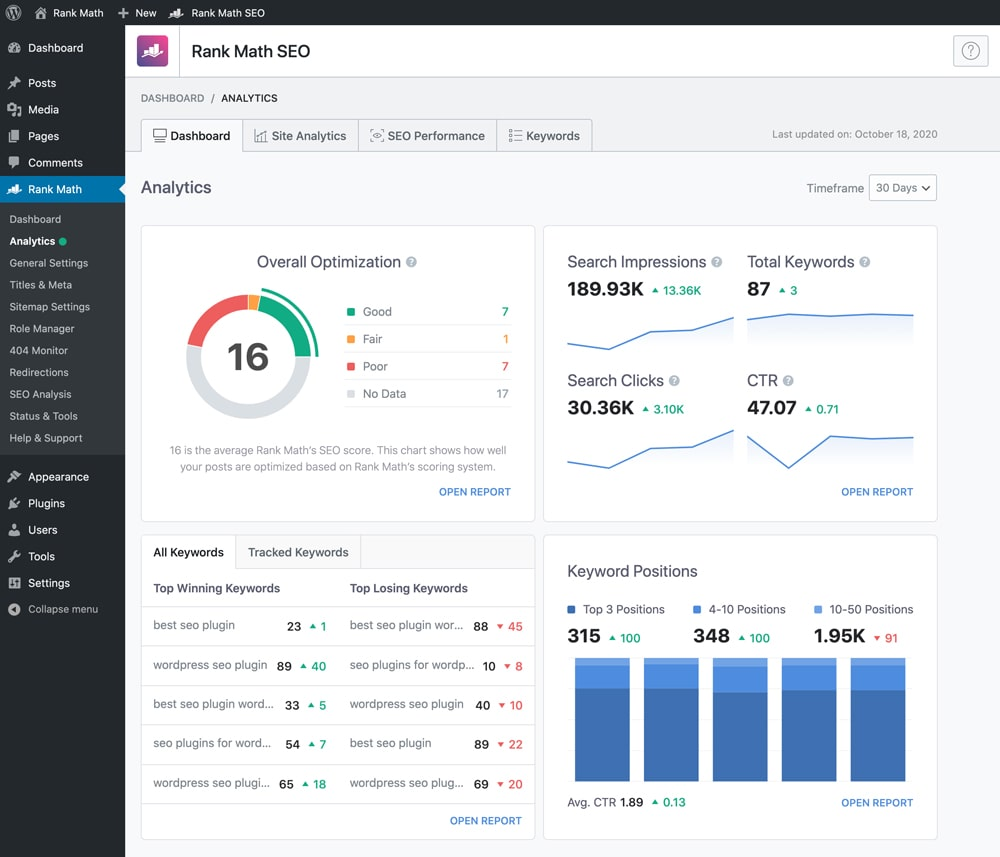
Its other features include:
- A user-friendly setup wizard to tailor the plugin to your needs
- Bulk content optimization
- Google SERP rank tracking and position history
- Integrations with other relevant plugins, like Proto
- 24/7 customer support
Pros and cons
Rank Math delivers an incredibly comprehensive feature set. Everything, including WooCommerce, is included; you won’t need any add-ons or additional plugins to access the features you need.
It also delivers most of your manual SEO needs on an automated basis, saving you time and freeing you up to focus on the more technical and strategic aspects of SEO.
On the downside, reviewers on G2 reported that leaving all of Rank Math’s many features active slowed down their websites, making for a worse user experience overall. You may need an extra tool to boost your website’s speed.
Users were also concerned about its steep learning curve, especially for its more in-depth functions. Because Rank Math comes with so many features, it’s easy for newcomers to SEO to feel overwhelmed by it.
Pricing
Rank Math offers three plans:
- A Pro plan at $95.88 per year, with tracking for up to 1,000 keywords
- An Business plan at $251.88 per year, with tracking for up to 20,000 keywords
- An Agency plan at $719.88 per year, with tracking for up to 75,000 keywords
While the most basic plan is as expensive as Yoast SEO’s premium version, it does include all of Rank Math’s features. Instead of paywalling features behind more expensive plans, Rank Math ties the price of your plan to the extent to which you can use its features.
That means that even though its features are all available to all users, its more expensive price tiers offer support for more websites and more tracked keywords.
Contender 3. All in One SEO
Best for: Marketers running a single website
Ratings (out of five): 4.8 (G2), 4.8 (Capterra)
All in One SEO, or AIOSEO (and formerly All in One SEO Pack), is a WordPress SEO plugin and toolkit that aims to give everyone the tools to use SEO without hiring an expert.
Its cornerstone feature is an in-depth SEO audit and on-page SEO analysis functionality. It delivers the information you need in a color-coded interface that provides clear indicators of where and how you need to improve:
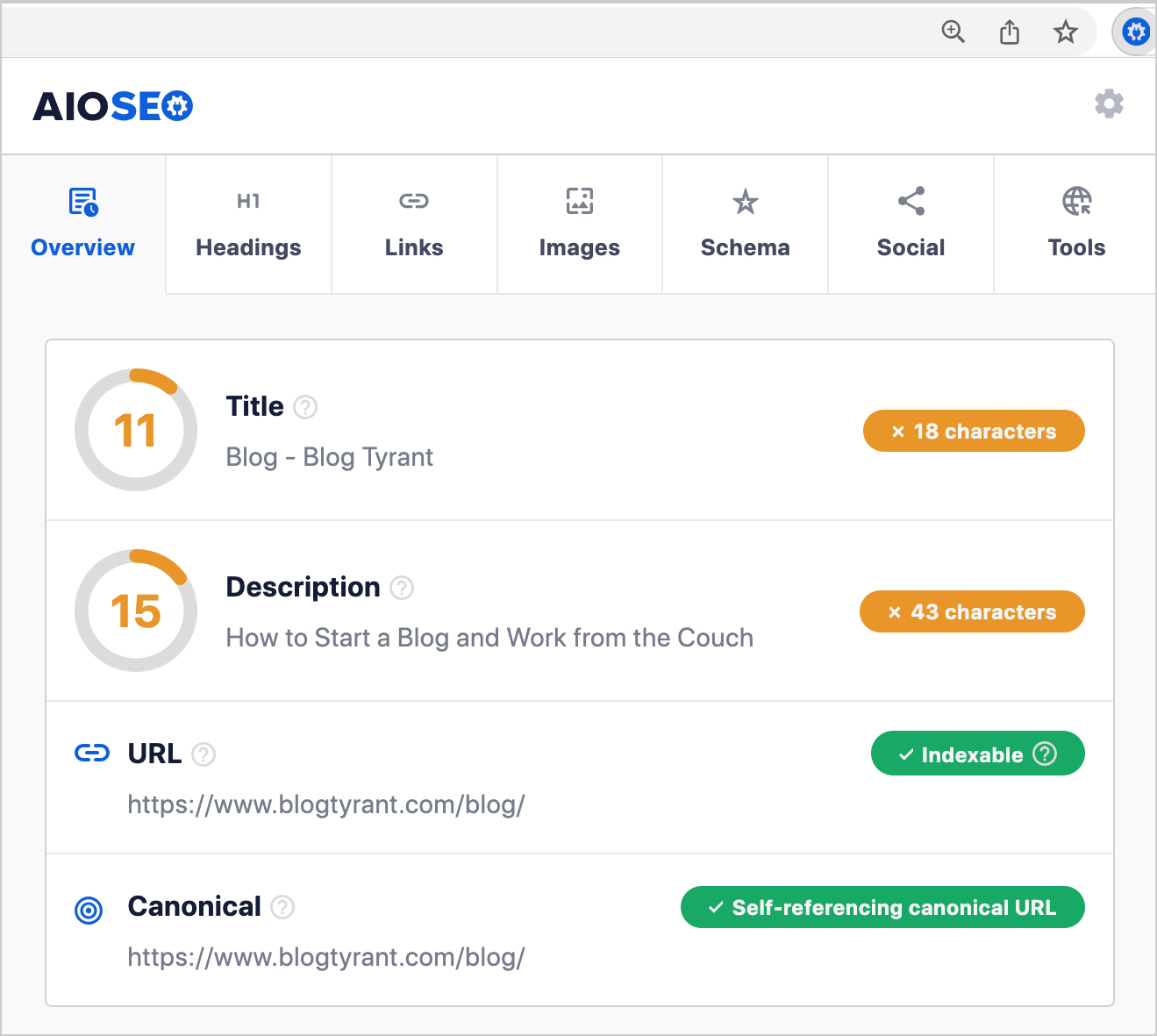
Its Search Statistics feature also makes it simple to track how you rank for your chosen keywords. You can use it to identify ways to refine your strategy and perform better on SERPs.
Other features include:
- WooCommerce SEO functionality
- Automated setup process to tailor the plugin to your site
- Rich Snippets schema markup support
- Link assistant to identify orphaned content and update broken links
- Preview functionality for social media links and Facebook snippets
- Full control of RSS feeds, Google News sitemaps, and breadcrumbs
Pros and cons
The All in One SEO plugin offers an extremely comprehensive feature set that integrates seamlessly into WordPress’s existing functions. It’s also intuitive for SEO beginners to use, with G2 reviewers lauding an easy setup process.
However, some G2 users report difficulties with bugs and an unwieldy UI, hampering the user experience. Reviewers also note that its already-high price jumped even higher for them after their first year, making AIOSEO prohibitively costly.
Plus, while many users found it to be straightforward to use, others felt that its initial learning curve was too steep.
Pricing
AIOSEO offers four plans with tiered costs:
- A Basic plan, including basic SEO and analytics features for a single website, at $124.00 per year
- A Plus plan, including more in-depth features for up to three sites, at $249.00 per year
- A Pro plan, including most features and priority support for up to ten sites, at $499.00 per year
- An Elite plan, with premium support and all features for up to 100 sites, at $749.00 per year
It’s much more expensive than any of its competitor plugins, which could put it out of budget for small business owners and bloggers. On the other hand, it offers enough features in its most affordable plan that it may still be worthwhile for anyone running a single website.
Contender 4. SEOPress
Best for: Users searching for a great free option
Ratings (out of five): 4.4 (G2), 4.5 (Capterra)
SEOPress stands out because, unusually for a WordPress SEO plugin, it offers a robust free version of its plugin that anyone can use. There’s also an affordable Pro edition with even more features if you need them.
Like its competitors, SEOPress’s free version offers SEO analysis that identifies what you need to do to improve. While some competitors limit the number of keywords you can analyze at a time, SEOPress makes it simple to analyze based on as many keywords as you need.
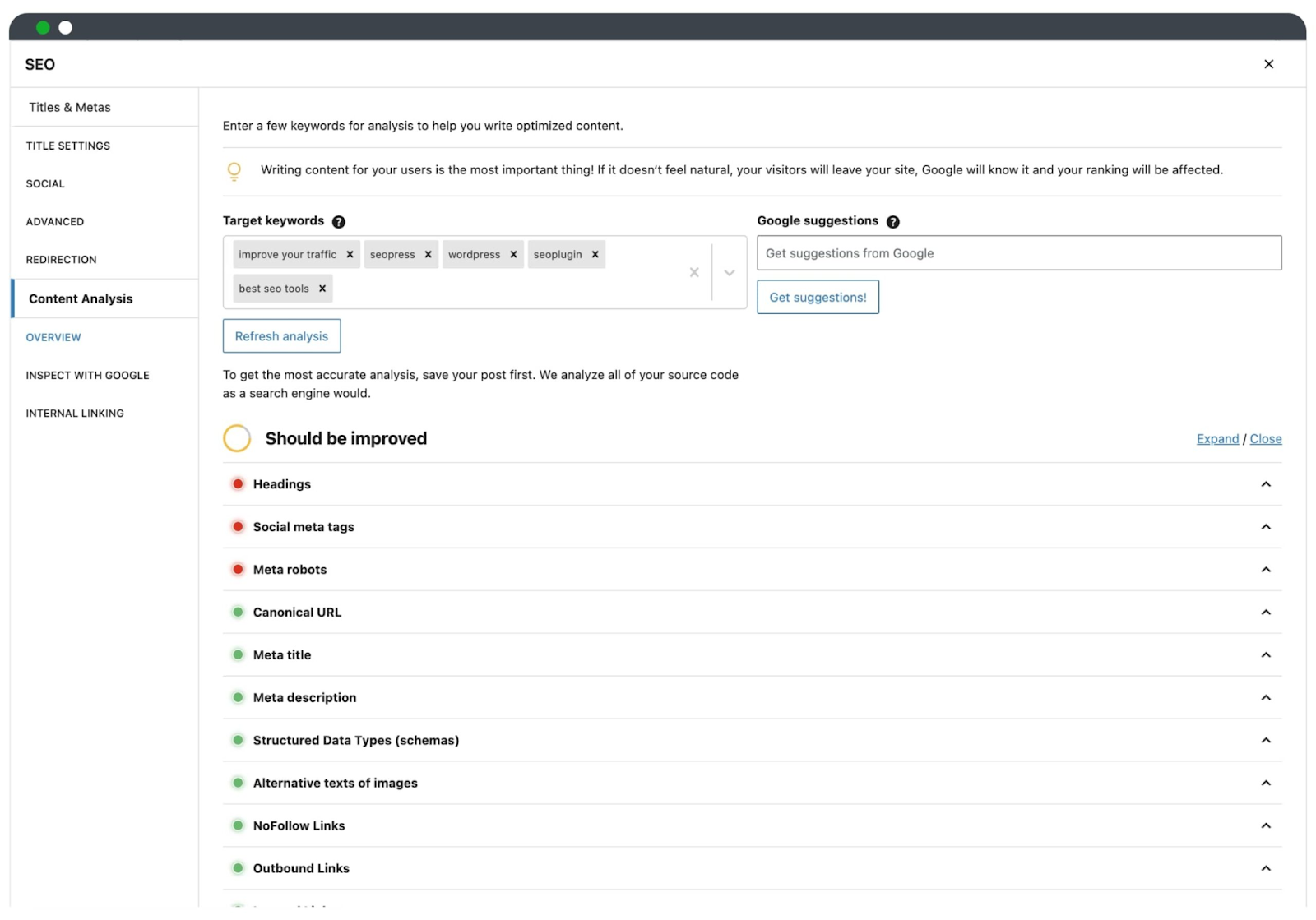
SEOPress’s free version also offers internal linking suggestions, insight into Google suggestions for search terms you may want to rank for, and ebooks to help you understand SEO techniques.
Other features available exclusively in the Pro version include:
- AI-generated metadata
- Insights from the Google Search Console
- Local SEO support
- Broken link detection
Pros and cons
The big advantage of SEOPress is that it’s highly affordable for anyone to use. There are also no ads on the free version of the plugin, so free users aren’t disadvantaged by unwieldy advertising.
Users at all pricing levels report that the plugin is easy to set up and use, too.
However, some customers noted that the plugin’s best features are paywalled. Free users may not have to deal with ads, but they also lose out on key SEO functionality that could help them develop their website further.
Reviews on G2 and Capterra also raised concerns about the plugin’s customer support. Some users reported being told that issues with the plugin were user errors and, accordingly, struggled to get timely help – not great in terms of user experience.
Pricing
As discussed, the basic version of SEOPress is totally free. It offers a surprising amount of features at no cost to the user, with no ads.
But for features like local SEO, WooCommerce SEO, schemas, and link redirection, you’ll need the $49.99-per-year Pro version. The Pro plan includes all the features you need to set up and manage your WordPress SEO settings.
If you need stronger content analysis, there’s also SEOPress Insights. It’s an off-site SEO plugin that provides in-depth insights into your Google statistics, your competitors, and your backlinks. That’s an extra $99.00 per year per site – an additional cost that quickly adds up.
Contender 5. The SEO Framework
Best for: Efficient, streamlined SEO functionality
Ratings (out of five): 4.9 (WordPress.org)
The SEO Framework advertises itself as the only WordPress SEO plugin that can intelligently generate SEO meta tags by reading your WordPress environment. This saves time, and means you don’t need in-depth SEO knowledge to make the plugin work.
Its color-coded overview bar lets you see what’s working and what isn’t for each page of your site. Just hover over each square to learn more.

It also boasts a unique structure, offering “extensions” that enhance your experience of the plugin and make it possible to do more. Available extensions include:
- Focus, to assist in SEO content writing
- Local, to assist in setting up local SEO information
- Monitor, to track your site’s optimization and statistics
- Cord, to connect your site to third-party services like Google Analytics
Users can install what they need, ignore what they don’t, and avoid a slow and bloated WordPress experience.
Pros and cons
The biggest pro of the SEO Framework is that it’s designed to be as lightweight as possible. There’s no bloat, and its stripped-back UI is gimmick-free and easy to use. It simply delivers what you need, without slowing down your website.
Plus, like SEOPress, its free version is totally free of ads.
Customer reviews flagged two major downsides, however. The SEO Framework lacks a link redirection manager, a key feature that all its competitors offer. This makes it harder to stay on top of broken links and orphaned content.
Its pricing structure also means you can’t buy a license for less than two sites, diminishing its value for money if you only need it for one site.
We don’t have a G2 score for the SEO Framework, because it doesn’t yet have enough reviews to have an average score. However, in the plugin directory of WordPress, it boasts a 4.9 out of 5 score.
Pricing
The SEO Framework offers four tiers of pricing:
- Free, including SEO functionality and access to free extensions, at no cost
- Pro, including all the Free plan’s features plus access to all extensions for up to two sites and 500 API requests monthly, at $84.00 per year
- Business, including all the Pro plan’s features for up to 20 sites plus 5,000 API requests monthly, at $204.00 per year
- Agency, including all the Business plan’s features for up to 200 sites plus 20,000 API requests monthly, at $324.00 per year
It offers amazing value for money – most of its competitors’ free versions aren’t as well-equipped. However, the modular nature of the plugin and the lack of key features like link redirection may not make this the best option for all users.
Our Recommendation: Yoast SEO
So which of these contenders is our favorite? It’s contender 1: Yoast SEO.
Yoast is simple enough for beginners to use successfully but advanced enough for SEO experts to be able to trust. It gamifies the steps of SEO optimization to help newcomers understand how it works but doesn’t compromise on its features or their quality.
At StateWP, we use the free version of Yoast SEO to introduce our clients to the world of SEO optimization. If they decide to commit to working with us in the long term, we upgrade to the paid account so they can fully take advantage of its feature set.
That means Yoast has the seal of approval from real SEO experts, as well as their clients.
Our second favorite plugin is contender 2: Rank Math. We love the way it integrates with other services like Proto, our dashboard tool, and appreciate that WooCommerce SEO is included. However, it isn’t quite as intuitive (or as gamified for beginner users) as Yoast SEO.
In conclusion: If you need WooCommerce or other specific integrations, Rank Math works well. For any and all of your other needs, we believe that Yoast SEO is the best SEO plugin for a WordPress website.
How to install Yoast SEO
To install the free version of Yoast SEO through your WordPress dashboard:
- Visit the Plugins page within your WordPress dashboard and select “Add New”
- Search for Yoast SEO
- Activate Yoast SEO from your plugins page
- You should see a notice to start the first-time configuration process
- Navigate this process and set up the plugin to suit your site’s needs
Alternatively, you can leave it to the experts. StateWP offers WordPress site maintenance services, empowering you to focus on what you do best while we handle everything to do with your website.
We’ll install, configure, and monitor the SEO plugin of your choice and deliver monthly reports on performance so you’re always up to speed.
Bonus: 3 Tools to Use Alongside Your WordPress SEO Plugin
As we’ve seen, some SEO plugins are missing features you may need. But that doesn’t have to be a dealbreaker when choosing your plugin – just supplement it with these additional tools.
Here are three we think are especially useful.
LowFruits
LowFruits, recently acquired by AIOSEO, is a tool designed to help with keyword research. It speeds up the process of analyzing SERPs and generates great long-tail keyword ideas based on your SEO strategy.
With LowFruits, it’s easy to identify when the top-ranking spot on a SERP is being held by a website with low domain authority and to understand exactly how to outperform that content and overtake it in SERP rankings.
It offers a pay-as-you-go pricing structure if you only want to pay for what you need, as well as annual subscriptions, including features not available via pay-as-you-go.
Redirection
Redirection is a free redirect manager plugin designed to fill any gaps in your SEO plugin’s redirect functionality. (We’re looking at you, The SEO Framework.)
It enables users to manage 301 redirects, track 404 errors, and monitor your site for any permalink changes. It even sets up automatic redirects if you change a permalink, so you won’t get caught short by orphaned content.
With Redirection, you can also:
- Set up conditional redirects
- Track all redirects on your site and export logs when you need them
- Import and export all your data whenever you want
It’s totally free, with no paywalled features.
WP Rocket
WP Rocket is a caching plugin designed to help your site load faster, improving its SEO visibility. It aims to boost your Google Page Speed score by speeding up your loading times and improving your website’s performance.
It takes about three minutes to set up after installation, and after that, it just works – you can forget about it and let it improve your site speed on its own. Its features include:
- Browser caching, to store your most frequently accessed site resources in a browser’s local memory
- GZIP compression, to compress pages on the server but decompress them in the user’s browser
- eCommerce optimization, which excludes sensitive pages from caching to prevent interruptions to the purchasing process
It offers tiered pricing based on how many websites you need to use it for, without any features paywalled.
Get the Best SEO WordPress Plugin Support with StateWP
A good SEO plugin for WordPress is critical to SEO success. It gives you the tools you need to boost your content efforts and lay the right foundation for great SERP performance.
We’re here to help you choose, set up, and manage your website’s SEO plugin. With a solution like StateWP, you never have to worry about maintaining or updating your plugins. We have experts on hand to resolve any issues, so you can always focus on your core business.
Ready to take your business to the next level with expert support? Let’s talk – we’re here to help.
Best SEO Plugin for WordPress FAQs
Still have questions about SEO plugins? Let’s explore the answers to the most common queries about plugins for SEO in WordPress.
Do I need an SEO plugin for WordPress?
WordPress has the basic tools you need to create and customize the basic aspects of SEO, like permalinks, image alt text, and meta descriptions and titles. But they’re very simple tools, and they don’t always deliver the best results. For in-depth SEO auditing, analysis, monitoring, and support, yes, you need to install a plugin for SEO in WordPress.
What is the best free SEO plugin for WordPress?
The best free SEO plugin for WordPress is Yoast SEO. Even though the free version of the plugin offers more limited features than the paid version, both still work extremely well, especially for users new to SEO. The Yoast plugin gamifies the optimization process to help beginners understand it and boasts an intuitive, simple interface that means anyone can get to grips with SEO basics.
Can I have two SEO plugins in WordPress?
No, you should only ever have one SEO plugin for your WordPress website at a time. Running more than one plugin may cause conflicts between them, resulting in unusual behavior or errors. This risks negatively affecting your users’ experience of your site, damaging your SERP rankings and visibility on search engines