
Wrong! A website health check is a matter of routine maintenance. Anyone can do it, and everyone should.
In fact, most sites are at risk of security breaches, poor SERP performance, and decreased conversions because their owners ignore website health.
With regular website health checks, limiting that damage is simple. Read on to learn how to manage website health the StateWP way.
Website Health 101
In this section, we’ll cover the entry-level basics of website health. Already know your UX from your user engagement? Feel free to jump ahead to our 7-step audit process and learn how to check your website health in the next section.
What Is Website Health?
Website health is a collection of metrics that gauge how well your site functions and performs. Your overall website health score is determined by factors like security, ease of use for visitors, and SEO optimization.

A healthy website is more likely to attract traffic and increase sales or conversions, so it’s critical for your business to stay on top of website health.
What Is a Website Health Check?
A website health check assesses your website health against basic performance and security criteria. It shows you the ways in which your site is healthy, and the places where you can improve your site’s health to boost visibility and conversions.
Why Is a Website Health Check Important?
If you’re wondering, “Why should I check my website health?”, there are two key reasons.
Firstly, website health checks ensure that your website is always performing at its best and yielding the best results. Second, health checks reveal any problems before they create more serious issues later.
It’s like routine preventative healthcare for your website. You wouldn’t take chances on your own health – why take chances on your site’s?
On that basis, you should perform website health checks at least once a year, if not more often.
How To Perform a Website Health Check in 7 Steps, the StateWP Way
Ready to perform a WordPress website health check? We’re here to help with this simple seven-step guide. Review all the steps below, then read on for more in-depth guidance.
| Step | How it helps |
| 1. Review your website security practices | Boosts customer trust and improves search engine rankings |
| 2. Check your page speed | Improves customer experience and SERP visibility |
| 3. Audit CSS front-end outputs | Encourages a better-designed website that’s easier to use and maintain |
| 4. Test your mobile responsiveness | Taps into a huge base of mobile web browsers to increase conversions |
| 5. Inspect your user experience and accessibility | Delivers a better customer experience, leading to higher engagement and improved SEO ranking |
| 6. Complete a content audit | Enables you to build a long-term content strategy focused on what works |
| 7. Check your primary traffic and engagement metrics | Empowers you to track the results of your website health maintenance |
1. Review your website security practices
If there’s a single top factor in website health, it’s security.
First and foremost, it’s a question of customer trust. If your site has a track record of security breaches, users are less likely to trust your business.
Secondly, sites that take basic security measures seriously rank better on Google’s search engine results pages. Google considers site security as a ranking factor, so if you want your website to be visible to searchers, it’s crucial to make sure it’s secure.
Lastly, bad security practices create a worse user experience. If you don’t have an SSL security certificate, for instance, browsers may flag your site as insecure.
That means customers have to jump through extra hoops to access it – and when they reach you, they’re likely to have less confidence in your site without a valid SSL certificate.
Our tool recommendations
The best way to handle site security is to be proactive. WordPress plugins like WordFence make it harder for hackers to break into your site, for example – and you should always aim to store as little sensitive data as possible anyway.
But to check for live security issues, it’s best to use a vulnerability scanner. Here are our top picks for use during your WordPress site health check:
| Tool | Features |
| Wiz |
|
| Snyk |
|
2. Check your page speed
Page speed matters to your users. The longer it takes for your webpages to load, the more likely customers are to abandon your site entirely.
An experiment by tech firm Portent revealed a site with a loading speed lower than 1 second has an e-commerce conversion rate 2.5 times higher than a site whose page loads in 5 seconds. That’s a staggering difference, and it comes down to just a few seconds.
A faster website can also improve customers’ perception of your brand. Users are more likely to see your business as efficient and effective if you have a speedy website.
Like site security, page speed is also a key factor in Google SERP rankings. Faster sites are more likely to rank higher in search results, bringing more organic traffic to your site.
Our tool recommendations
There are plenty of page speed checkers available, both free and paid. These three are our favorites – each has a different feature set, so choose the one that evaluates your site speed in the most helpful way for you.
| Tool | Features |
| Google’s PageSpeed Insights |
|
| GTMetrix Page Speed Tester |
|
| Pingdom Website Speed Test |
|
3. Audit CSS front-end outputs
CSS auditing is the process of checking your website’s CSS files to identify issues and areas for improvement. There are a few great reasons to make a CSS audit a part of your regular website health check:
- Performance: If your CSS code base is messy, overloaded, and unstable, it could lead to performance issues. A good CSS audit will help you trim what you don’t need and tidy up what you do.
- Consistency: There are several ways to achieve the same effect in CSS, but it’s better for the health of your website to keep things consistent. An audit helps you identify and eliminate these inconsistencies.
- Accessibility: Auditing CSS can reveal inaccessible elements of your design, like colors with low contrast that are hard for users to read or fonts that may be too small for different screen sizes. Improving accessibility leads to a better user experience; more on that below.
Remember to audit your CSS on both desktop and mobile to maximize the benefit of your site!!
Our tool recommendations
CSS is trickier to audit than other code languages, because browsers tend to ignore CSS errors. Plus, because it’s possible to achieve the same effect in different ways in CSS, inconsistencies can be hard to spot.
On that basis, we strongly recommend seeking out an expert to help you manage a CSS audit. In fact, it’s the kind of project we love here at StateWP. Message us today and let us know how we can help!
However, if you’re really keen to do it on your own, these free tools can help:
| Tool | Features |
| Chrome DevTools |
|
| Project Wallace |
|
4. Test your mobile responsiveness
As of Q3 2023, 54% of all web traffic came from mobile phones. If your site isn’t easy to browse on mobile, you’re losing customers.
A mobile-friendly website is easy for customers to navigate on any device, without layout glitches or slow loading times. It should deliver a user experience that’s just as smooth as the experience your site offers for desktop browsers.
On the flip side, mobile usability issues can seriously jeopardize your website health score. You need to monitor your website carefully for the following issues:
- Slow speeds on mobile browsers
- Broken or distorted mobile layouts
- Tappable areas not responding
- Incorrect image placements and sizes
- JavaScript errors in mobile browsers
Our tool recommendations
The simplest way to check your site’s mobile responsiveness is to open your site in a mobile browser. If the resolution looks good, the images aren’t stretched, all tappable areas work well, and the pages are quick to load, you’re probably good to go.
But for more in-depth verification and analysis, there are tools out there to help you monitor whether your site works well on mobile devices. Here are our picks:
| Tool | Features |
| TestSigma |
|
| Responsinator |
|
5. Inspect your user experience and accessibility
User experience, or UX, is a catch-all term for the overall experience a customer has when using a website. It measures how a customer feels about a website’s helpfulness, ease of use, and efficiency.
Sites that offer a positive UX keep customers browsing for longer, which leads to better SEO rankings. Conversely, a negative UX is likely to result in reduced customer loyalty and low conversion rates.
Accessibility is a specific subtype of UX that describes how readable, navigable, and usable your site is for everyone. That includes disabled users. The Web Accessibility Initiative’s Web Content Accessibility Guidelines state that web content should be:
- Perceivable: Presented to users in ways they can perceive, either through sight or sound.
- Operable: Functional for users in ways they can operate.
- Understandable: Presented with clear instructions and easy-to-use navigation methods.
- Robust: Capable of being interpreted by a wide variety of users and assistive technologies.
This is so important to get right that it’s worth bringing in experienced web design developers who understand UX. Check out our plans to see how we can help you make your site more user-friendly and accessible to everyone.
Our tool recommendations
Google Analytics offers some insight into how users use your website, via statistics such as bounce rate and page exits. But UX website analysis tools provide a more in-depth look that’s specifically grounded in UX principles.
Here are our favorite tools for assessing UX and accessibility:
| Tool | Features |
| Crazy Egg |
|
| Hotjar |
|
| WAVE |
|
6. Complete a content audit
High-performing content is a cornerstone of website health and visibility. If your content isn’t delivering what you need it to deliver, you aren’t getting the most out of your website.
A website audit of your content helps you:
- Ensure all your existing content aligns with your brand voice and style guidelines
- Identify areas your current content doesn’t cover, providing ideas for future content
- Check for broken links or other hiccups that may be hindering your strategy
- Spot opportunities to improve user engagement
- Develop new ideas to increase conversions through content and digital marketing
To audit your content, you need to compile a list of all the relevant content pages on your site, from blog posts to white papers. Then use your website analytics to evaluate how each page is performing in terms of SEO, traffic generated, duration of stay, and conversions generated.
You can then use that information to develop plans to improve and maintain your content performance in future.
Our tool recommendations
Ultimately, the best way to audit your content is to have a human do it, using content auditing tools like Semrush or Ahrefs as a supplement – particularly if you have a larger website, and auditing all your content manually would be unsustainable.
These content auditing tools help website owners understand how their content is performing:
| Tool | Features |
| Semrush |
|
| Linkgraph |
|
7. Check your primary traffic and engagement metrics
The last step of a website health check is to understand what your traffic and engagement metrics look like.
You may already know what they look like, but it’s an important way to track progress as you get to work on the issues your health check turns up. Monitoring your metrics over time helps you see whether the changes you make are working.
Here are the metrics we recommend that you keep an eye on:
- Audience information like location and user demographics
- Visits on a daily, weekly, and monthly basis
- Unique visitors to your site
- Traffic sources to understand how people are finding your site (e.g., through backlinks or social media)
- Conversion rates from visitor to customer
If the work you do to improve your website after your health check is effective, you should see most of these metrics get better, too.
Our tool recommendations
The easiest way to check your metrics, as long as you have a WordPress site, is in your WordPress analytics. However, you can augment your data with these plugins, which make any site health check on WordPress a breeze:
| Tool | Features |
| Google Site Kit |
|
| Jetpack Stats |
|
The Best Choice for Website Health: Outsource Your WordPress Maintenance
As you can see, carrying out a health check on WordPress is a big undertaking.
As a business owner, you don’t have time for all that. So what if we told you there’s another way to get it done (and to get it done right)?
At StateWP, we’re prepared to handle all your WordPress site maintenance needs, including regular health checks. We’re a team of experienced WordPress professionals who run health checks monthly, rather than yearly – that’s how much we care about website health.
Here’s what we have to offer:
- A dedicated account manager: Someone who’s always available for requests, concerns, or urgent site-related tasks.
- Fast response times: We respond to all messages within hours and usually complete requests within one day, so we won’t ever leave you hanging.
- A one-stop dashboard: Proto, our comprehensive tool for site health and analytics, is the best website health checker in the business, as well as an easy way to make requests or ask questions.
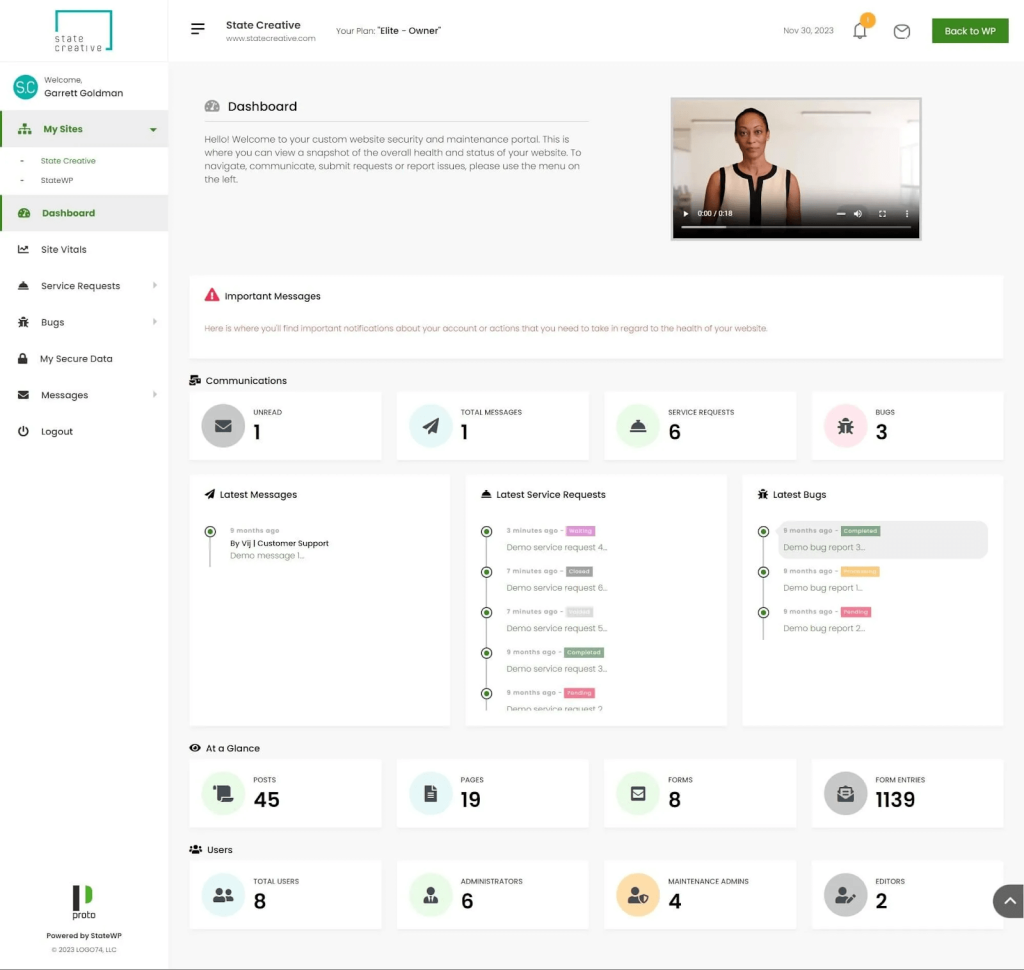
- Comprehensive security support: We’re proactive about managing your themes and plugins, and dedicated to protecting your website from hackers and vulnerabilities.
- Tiered pricing: You only pay for the level of support your business needs.
Get Ahead of Your Website Health Now
If you want your business to succeed, you need a healthy site that runs like a dream.
Website health is critical for visibility, customer experience, and conversions. Errors, security issues, and poor UX will cost you money, and the longer you procrastinate getting them resolved, the more money you stand to lose.
But when you work with StateWP, you’ll never have to worry about expensive WordPress errors again. Experts will be on hand to manage your regular website health checks and resolve any emergencies.
Reach out to us today and learn how we can work together.
Website Health Check FAQs
Still have questions? Read on for our answers to the most common queries about website health.
How do you check if a website is working properly?
You can check that your website is working properly with a free website health check. A health check measures your website’s performance against key metrics like speed, user experience, mobile responsiveness, and security.
To learn how to perform an in-depth health check like a web development expert, check out our seven-step guide to checking your website’s health.
Does site health affect SEO?
If your site isn’t healthy, it may be harder for bots to crawl and index, preventing your website from ranking highly on search engine results pages.
What is an SEO health check?
A SEO health check is an overall look at the state of your website’s SEO. It isn’t quite the same as a website health check, although both approaches aim to help your website function as effectively as possible.
A SEO health check could form part of a content audit, as part of a wider website health check.