
Without regular maintenance, your business’s website is doomed to fail. Take your loading speed. If you don’t regularly optimize your site so it loads in fewer than five seconds, your site will eventually slow down and customers will move on to faster, more responsive competitors.
When you don’t maintain your site’s content, security, and accessibility, you set yourself up to lose traffic, revenue, and reputation. 💸
Below, we explore how to manage small business website maintenance and offer you actionable tips that’ll keep your site humming along beautifully.
Skip ahead to find out:
- Why website maintenance matters
- Six ways to start maintaining your site
- Why working with an agency offers complete peace of mind
What Is Website Maintenance for Small Businesses?
Website maintenance for small businesses refers to keeping your site running and performing well. It covers checking, editing, and updating online content so it attracts new customers, keeps them engaged, and drives repeat sales. Maintenance areas include website security, user experience (UX), content auditing, and search engine optimization (SEO).
Some typical maintenance tasks are:
- Refreshing landing pages so they appear in relevant search results
- Scanning for malware and securing a site to protect personal information
- Testing web forms to keep leads coming in
- Optimizing loading speeds to keep new customers engaged
- Editing web design so it’s accessible and responsive on different devices
Why Is Website Maintenance Important to Small Businesses?
Regular website maintenance helps small business owners attract and convert new customers and build strong reputations.
For example, editing content and optimizing accessibility is great for SEO. These regular maintenance jobs can keep small businesses ranking highly in relevant search results.
Monitoring website security also keeps customer confidence high. An attack that results in data loss could devastate a small business’s reputation – around 60% of small businesses that get hacked close within six months.
Let’s explore more benefits of website maintenance for small business owners:
| Area of focus | Benefits for small businesses |
| Website security |
|
| User experience (UX) |
|
| Content audit |
|
| SEO performance |
|
How To Perform Small Business Website Maintenance
Blog content, plugin updates, design features… Your small business site has many moving parts. To maintain an online presence, you must manage them all and more to ensure you present an attractive, relevant experience and start converting customers.
You can either go the DIY route or outsource maintenance to an expert.
We’ll break both options down.
1. Start with 6 steps to improve your website
Going DIY? Here are six initial steps to ensure your site’s performing at its best.
1. Plan for Maintenance during the Build Stage
When building your website, remember that it isn’t set in stone – you must come back and tweak it.
Over time, your customers’ needs change, so you must plan for changing navigation and visuals. You might need to change your content so it’s relevant, or add links and keywords to boost your website’s SEO.
At this stage, simply being aware that your website is going to need regular maintenance is a good start.
Backing up your website means saving your content so it’s easy to reload when needed.
If, for example, your website is hacked, or you make a mistake when editing it, loading a backup brings everything back online fast. It means less business and revenue lost, and less time spent repairing.
Saving and loading backups on WordPress is easy with a plugin like UpdraftPlus. This software lets you save backups whenever you make changes, and you can often do the same with leading web hosts.
Consider setting up automated backups to save time and hassle remembering to save every week.
Updating your WordPress version, security plugins, and themes protects your site against hackers. Buggy and outdated software gives hackers ample access to break in and wreak havoc. When data is compromised, you risk losing customers’ trust and business!
You should update your WordPress version when new releases become available. Check for new releases in “Updates”:
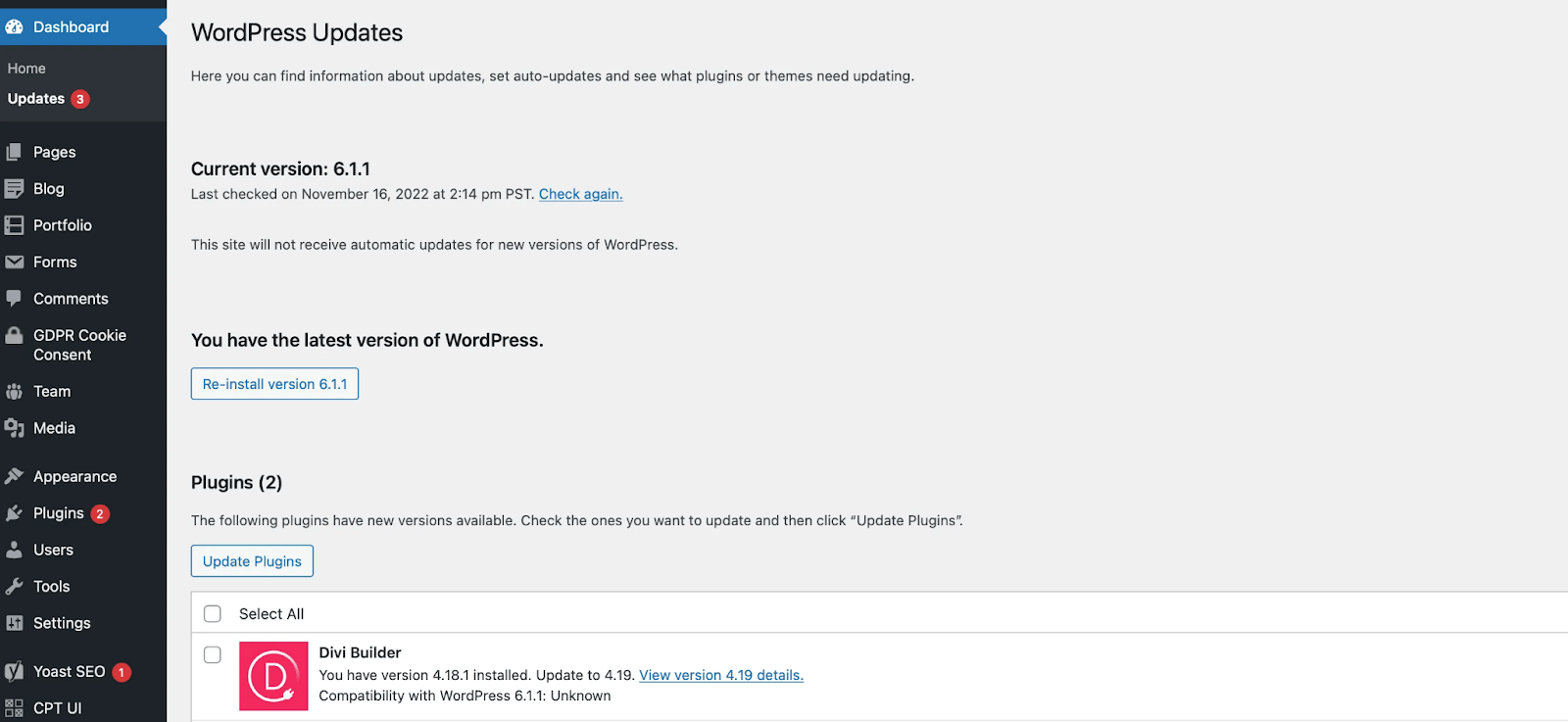
This page also reveals available plugin and theme updates. You can update these individually through the same screen. Additionally, you can update plugins via the main plugins menu:
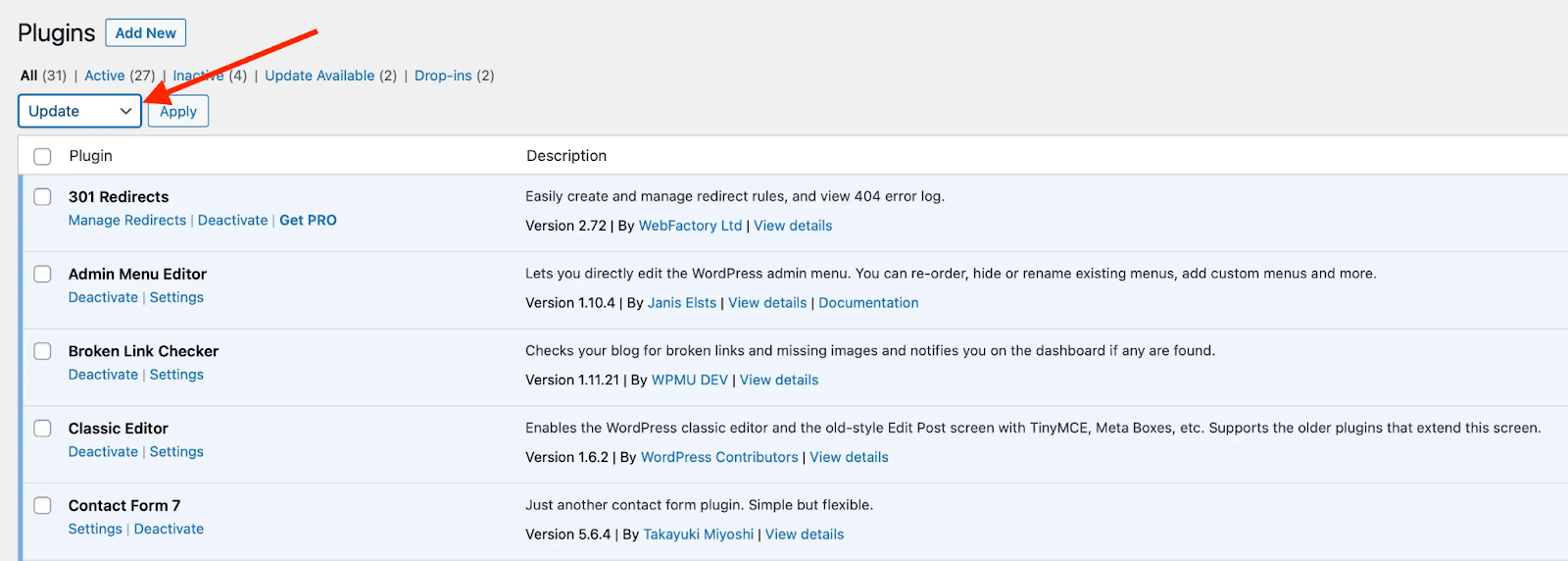
The best way to stay protected is to avoid the temptation of automatic updates and stick to a regular routine of manual updates. This is best done by experts who can check for compatibility and potential errors before updating anything.
You can monitor your site’s performance over time in a few different ways. To start, check your WordPress analytics at least once weekly to see where visitors are heading and where you’re converting customers.
For example, you can use conversion data from landing pages to see which content encourages the most sales. Which posts lead the most paying customers down the funnel, and which pages attract customers the most through search results? Drill down into the call-to-action buttons that drive the most conversions and use the data to inform your future content.
You can dive into this data with a solid all-in-one plugin such as Analytify, which lets you connect your Google Analytics 4 (GA4) account to WordPress. That said, GA4 is a crucial tool you should get accustomed to if you want to take control of your site’s performance. Our complete guide to website analytics goes into more detail about how to get started with analytics software.
From here, focus on loading speeds. The slower your site is, the faster visitors bounce and go elsewhere.
For example, a third of visitors leave a page if it takes three seconds to load compared to just one. Moreover, Google reportedly penalizes sites in search results if pages load too slowly.
So, check your site’s loading speeds at least once a week with a tool like GTMetrix, which breaks down different factors that lower your loading speed.
Knowing how to make a website faster isn’t always easy, so remember these quick tips from our complete guide to speeding up WordPress pages:
- Choose a lightweight, mobile-friendly theme
- Switch to a private or dedicated hosting provider where you don’t have to share resources and bandwidth with others
- Use a plugin such as Autoptimize to minify your site’s code
- Remove unnecessary plugins
- Use a plugin such as W3 Total Cache to reduce loading times
Checking traffic analytics and page speed are two steps we consider part of the ideal website health check.
Much like outdated content, broken links annoy your visitors. They might click or tap on a blue link only to find that a page has moved or no longer exists.
Beyond this, broken links can lead Google to drop you lower in search engine rankings. Its automated crawlers need a complete, linked-up site to explore so it knows which content is genuinely helpful for searchers.
Since two-thirds of external site links are dead, that’s one statistic you want to avoid. To do so, use the Broken Link Checker plugin at least monthly to manage any missing connections. When installed, you can find it in your dashboard:
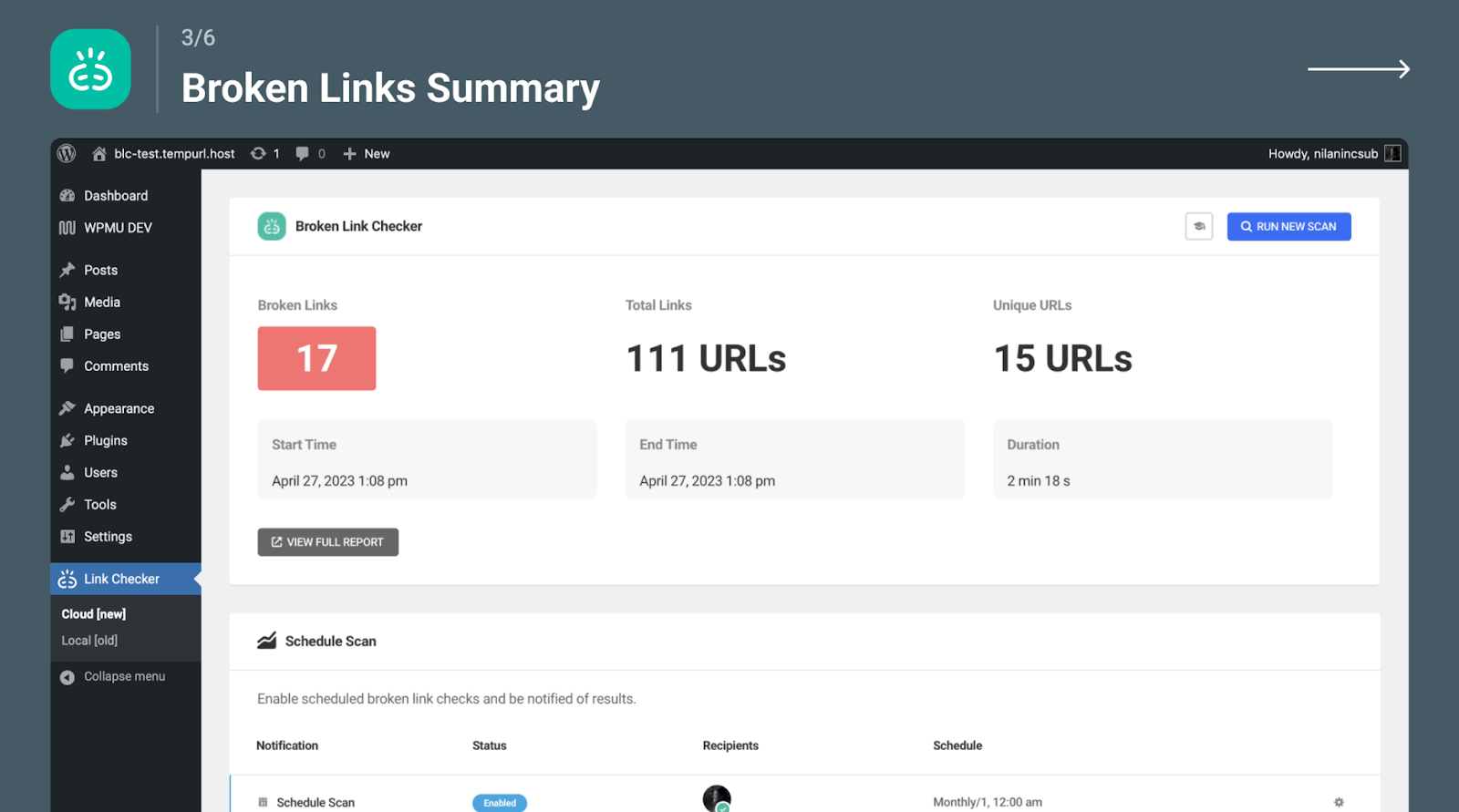
You can see a list of broken links detected by the plugin, with the option to repair and, in some cases, replace them with suggestions.
Over time, your customers’ needs change, so you should always audit your content to ensure it’s still relevant and useful.
Google could penalize you if your content isn’t “helpful” by its standards. It has erased around 40% of “low-quality, unoriginal content” in search results since 2022.
Auditing your online presence is also important if you’re not pulling in visitors or converting them into paying customers. Look carefully at your best-performing pages and try to take stock of what makes them more popular than others with visitors. Could you repurpose your calls to action or knowledge for future articles?
You should also revisit content occasionally to re-optimize for SEO by adding more links to authority sources, relevant keywords, and internal links.
Review your content at least yearly or more frequently if there are changes in your industry (for instance, if new trends emerge).
Check out our website maintenance checklist for a more detailed breakdown of DIY tasks.
2. Outsource your small business website maintenance to optimize performance and boost ROI
Although you could handle website maintenance for small business needs yourself, as you can probably tell, it’s a lot of work.
Instead, many small business owners team up with a website maintenance service provider to handle the nitty-gritty. Here are the three main reasons why:
You save time and resources ⌚💸
If you’re busy growing your business, you can hardly afford to maintain your website and constantly check its performance. Your team’s time is better spent driving revenue into your business. Beyond that, investing in a partnership with a website provider with a track record of effective website maintenance also means:
- You cut down on costly potential issues
- You have more time to build on leads
- Your site is always performing at its best to convert visitors
- You’re secure and protected against the latest cyber threats
- You maximize your search engine rankings
You always have a maintenance expert by your side 👨💻
Imagine if a common WordPress error takes your site offline for two or three days. That translates to lost time and money. Worse, you may not have the expertise to get your site back online and maintain it.
Having a team of experts on your side means you can use a proactive approach and address potential issues and concerns with maintenance as soon as they arise. You don’t have to spend days looking for the right freelancer or muddling around with your site on your own.
You’re ready to scale 📈
A maintenance partner is always there to help you scale up your site or develop additional sites for international audiences.
A great example of a business following this route is Lead Liberated, a nonprofit that approached StateWP on a starter plan to help manage and update its website. The company’s previous partner didn’t provide a valuable service. Content updates were lagging, fees were high, and support was sluggish.
StateWP turned the firm’s fortunes around. Our dedicated support team helped Lead Liberated save several hours otherwise spent updating and maintaining its site. We have stayed on hand to take care of background admin while the nonprofit grows.
“Partnering with StateWP for our website maintenance has given us peace of mind. As a small nonprofit, we don’t have the internal resources to devote to technical upkeep. Knowing that StateWP’s team is monitoring our site and handling any necessary updates or security issues allows us to focus on our core mission. Their reliable and expert support is invaluable.”
– John Westerlund, Lead Liberated
How to Choose the Right Small Business Website Maintenance Partner
Ok – so, the benefits of choosing a website maintenance service provider for your business are clear. How do you find one that offers the best expertise and support for your money?
Let’s consider some key points when comparing WordPress maintenance companies.
What to look for in website maintenance experts
| Consider… | Does my maintenance company offer… |
| Experience with small business websites |
|
| Comprehensive and scalable packages |
|
| Clear communication |
|
| 24/7 support |
|
Example: StateWP website maintenance plans for small businesses
StateWP offers three website maintenance plans tailored to small businesses looking to grow:
- The Starter plan, from $99/mo
- The Premium plan, from $314/mo
- The Elite plan, from $630/mo
We designed these website maintenance packages for small business owners to specifically give you expert oversight and on-demand help.
The Starter plan is a launchpad for businesses that need help with regular backups, real-time security monitoring, hack support, site restoration, monthly analytics, and security updates. It covers the absolute must-haves in WordPress routine maintenance.
Businesses like The Ballet School joined StateWP with a Starter plan to avoid technical issues by managing regular updates and crunching regular analytics. As a result, this firm saves hours on admin every week and continues to grow its customer base.
The Premium plan, meanwhile, adds an extra two hours a month for dedicated website edits, full training and support, dedicated account management, and mobile testing.
With a Premium plan, we helped revamp and relaunch Ranchod Law Group’s website by migrating it to a new server at a flat fee, boosting its Google Page speed from 38 to 94 for mobile, and improving its GTMetrix score from grade E to A.
The Elite plan is ideal for those looking for a hands-off package with total peace of mind thanks to four hours of website edits, staging sites, SEO audits, and advanced e-commerce functionality.
If you want to know more about the benefits of a well-maintained website through these packages, start with a free website audit and then book a free consultation for our help in implementing the improvements.
Take the Stress Out of Website Maintenance for Small Business Owners
As tempting as it is to set up a small business website and just leave it be, you need to care for it regularly to keep attracting potential customers. You should always start by drafting a plan, updating your site, and backing up anything you create.
From there, the maintenance tasks come thick and fast – meaning it’s always best to use a holistic approach and outsource to an experienced, professional partner like StateWP.
With our tailored website maintenance plans and dedicated support teams, we assess your needs, keep your WordPress site performing at its peak, and help you hit revenue targets quarter after quarter.
To find out more, check out our complete guide to WordPress website maintenance for an overview of why maintaining a healthy site matters.
Small Business Website Maintenance: FAQs
Let’s finish our guide by answering some commonly asked questions.
What maintenance is required for a small business website?
What are the common website maintenance issues faced by small businesses?
- Poor mobile performance optimization/responsiveness
- Slow loading speeds
- Clunky or awkward website navigation and design
- Poor security monitoring, leading to risks and security breaches
- Website hosting flaws (e.g., shared hosting load times and errors)
- Search engine ranking failures
- Persistent errors they are unable to fix themselves
- High maintenance costs (over $750 per month) with poor responsiveness