
Failing to prepare your site against security risks means you could lose data, revenue, and reputation at any time. Are you sure you’re doing enough?
Let’s explore eight of the most common WordPress security issues and how you can prepare for them – and remember, you can reach out for help!
- Vulnerabilities in plugins and themes
- Weak passwords and lack of two-factor authentication
- Poor control over user permissions
- Malware and malicious plugins
- Unrestricted XML-RPC protocol
- Code and scripting attacks
- DoS and DDoS attacks
- Zero-day exploits
1. Vulnerabilities in Plugins and Themes
Outdated themes and plugins, or those developers have left unpatched after new WordPress version releases, are easy prey for hackers.
When developers don’t update their software, hackers can easily exploit code that’s been out in the open for some time.
How to protect your site
To avoid WordPress plugin security issues from the get-go, only install software recognized by WordPress itself. That way, you know it’s legitimate, and that you can hold developers accountable for regular updates and security patches.
Before installing any new software, check when a plugin or theme was last updated, and that it is compatible with your version of WordPress. These details are typically available via the WordPress Plugin Directory on each download page for a plugin or theme:
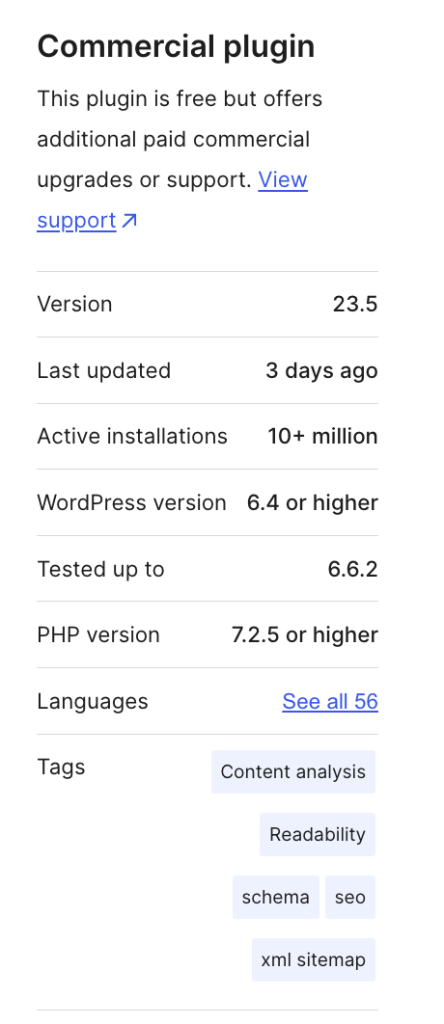
From here, ensure that your website and plugins are always on the latest version! You can 1) update plugins manually, 2) turn on automatic updates, or 3) rely on an expert maintenance service to do the updating regularly for you (after they check for compatibility or version issues)
2. Weak Passwords and Lack of Two-Factor Authentication
Hackers use brute-force attacks to force their way into websites with tools and bots that can run billions of login attempts in minutes.
With a weak password and a default “admin” username combo, you’re opening yourself to security threats.
How to protect your site
Set strong passwords that contain a mix of uppercase and lowercase letters, numbers, symbols, and no obvious words or phrases. You can use Security.org’s password security checker to test phrases and see how easy they are to crack.

Most internet browsers let you choose a secure password when registering for the first time. You might see this dialog pop up when using Chrome:
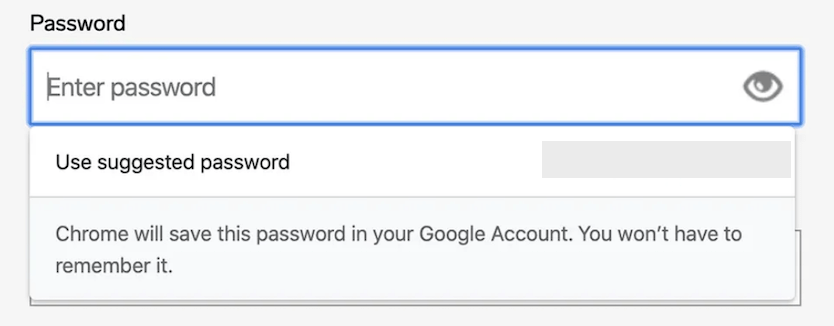
Alternatively, you could install a password generator plugin for WordPress, or use an external password manager such as LastPass, which doubles as an encrypted safe for your logins.
You should also consider multi-factor authentication (MFA). MFA adds an extra security step before people can access your website, such as entering a code received by a registered email or phone.
We recommend installing a plugin such as WP 2FA, which asks users to confirm they are logging in via an app or email. By setting up this extra step, you can ensure only you (and anyone you authorize) can access your site.
3. Poor Control Over User Permissions
Generally speaking, only your site’s Administrator should have access to all controls, such as editing, deleting, and authorizing new users, core software, and content.
However, all new users you create are Administrators by default. The more people with these permissions, the higher the risk of hackers gaining unauthorized access through all sorts of means:
- Phishing
- Fake login pages
- Site request forgery
- Malicious redirects
Can you be sure that you trust users to protect their login details from all those WordPress vulnerabilities?
In addition, all a brute-force attacker needs to do is take over a basic user account and have complete admin rights.
How to protect your site
Think carefully about the permissions you want to grant to each user. Here’s a quick breakdown of user roles:
- Administrator: Complete access
- Editor: Edits and publishes all users’ posts
- Author: Edits and publishes their own posts
- Contributor: Writes and edits their own posts
- Subscriber: Can only access their profile
If you already have people registered to your website, head to “Users” in the WP dashboard and select “All Users”:

On the next screen, select the user(s) you’d like to edit, click the dropdown menu reading“Change role to…” and set the appropriate permission level. Click “Change” to finalize:
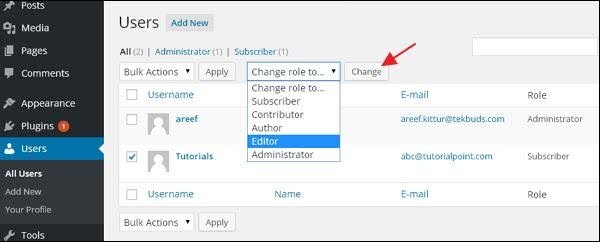
When adding new users, make sure to choose the appropriate role you wish to set from the “Role” dropdown box in the registration form:

4. Malware and Malicious Plugins
Regardless of how it ends up in WordPress, malware can crash your site, harvest data, and even lock you out of your dashboard.
Here’s some more advice on how to protect your WordPress website against these threats.
How to protect your site
Remember to restrict how many people can access full administration permissions. Only reserve top permissions for those you can safely trust, if at all.
WordPress also has a built-in feature that prevents certain files from being uploaded. You can bypass this as the Administrator, however, so don’t rely on this wholesale.
As mentioned above, updating everything is key, and so is sticking to WP-approved plugins.
However, we also suggest installing a reputable malware scanning plugin that you can download via WordPress’s plugin library.
In particular, we highly recommend using Sucuri, which has free and paid features.
Beyond this, dive into our guide on what to do if your WordPress site is hacked, which offers further preventive tips.
Last of all, be wary of confidence tricks. Only download and install software through WordPress directly, and don’t trust emails from providers you don’t recognize. Email scams commonly mimic official services such as WordPress and ask for sensitive data.
5. Unrestricted XML-RPC Protocol
XML-RPC, or xmlrpc.php, is a protocol that helps to bridge communications between WordPress and various resources. It’s proven useful in helping to bring WP to mobile devices over the years. However, REST API has since replaced XML-RPC’s functionality.
That said, there’s a chance XML-RPC is still active on your website, and it’s best to disable it because it could be a cybersecurity liability. This is because, much like outdated software or plugins, the obsolete feature could offer backdoors for cyberattacks.
WordPress has kept XML-RPC active because it wishes to retain backward compatibility, but you’re safer just deactivating it.
How to protect your site
Visit the WordPress XML-RPC Validation Service and enter your website URL to check if the file is active.

If the file is active, we recommend installing a plugin to disable it. Download and install Disable XML-RPC, which is available through the WordPress store. Simply activating it removes XML-RPC from your site.
6. Code and Scripting Attacks
Hackers can sneak into websites by injecting malicious code into your SQL or Javascript, which can lead them to create user accounts, delete data, and leak sensitive information.
SQL is a programming language WordPress uses to manage your database, i.e., where your media and WordPress core files are stored.
Typically, hackers can attack websites by entering malicious code into forms that let them into the SQL and the data within.
Once inside, they can add code to your website’s backend by running XSS or cross-site scripting attacks. XSS attacks can lead to websites crashing completely, attackers leaving harmful links across your pages, or leaking data.
How to protect your site
The best way to protect your site from SQL injection and XSS attacks is to keep WordPress, all your software, and your database updated and patched.
A managed WordPress hosting provider can provide additional cybersecurity, too, such as a web application firewall (WAF) that can prevent malicious user inputs. Make sure to run security plugins like Sucuri or Wordfence to monitor for and remedy SQL attacks, too.
You can also fortify your database against attacks by adding code to your wp-config.php file, which manages WordPress’s configurations.
This can be a complex process that involves logging into the phpMyAdmin tool via your web host. Therefore, if you want to take action but are unsure of what to do for the best, ask for help from your host or a StateWP developer.
SQL and other injection attacks on WordPress are pretty common. They’re relatively easy for hackers to carry out, and Administrators have limited scope to prevent them. Therefore, your best option is to partner with a development team that always has your back!
7. DoS and DDoS Attacks
Denial-of-Service (DoS) and Distributed-Denial-of-Service (DDoS) attacks essentially overwhelm a website with traffic to the point where the server running it crashes.
A DDoS attack, specifically, is the nastier of the two. It’s a bigger, more threatening onslaught launched by several devices at once. This method of attack is also easy to hide.
DDoS attacks primarily bring down websites and servers to harm reputation. You might remember a few high-profile cases in the news, such as Sony’s PlayStation Network falling prey to an attack by Anonymous back in 2011.
How to protect your site
Using a secure server is your best shot at avoiding DoS and DDoS attacks. That means registering with a leading hosting provider with strong reviews, and one that also has built-in tools to help fight back against traffic flooding (we recommend WP Engine, for example).
8. Zero-Day Exploits
The scariest types of attacks are those that are completely unknown and unaccounted for, even by experts.
Unfortunately, hackers always find a way to launch new, more threatening attacks on unsuspecting site owners.
Zero-day exploits are vulnerabilities that are discovered ad hoc. These weaknesses are simply unaccounted for by developers and website managers, meaning there are no ways for you to specifically prevent them from being exploited.
These exploits are probably the trickiest to deal with in our WordPress security issues list, but there are a few basic steps you can follow to minimize your chances of being affected.
How to protect your site
Zero-day exploits might be impossible to account for until you actually know what they are, but you can boost your chances of falling victim to them by continuing to practice good site maintenance and taking appropriate security measures.
That means keeping your site updated, using a WordPress security plugin, running a firewall, and using a secure server. For your best shot at avoiding unknown weaknesses, you should also enlist the help of seasoned WP developers. Speaking of which…
Ensure Your WordPress Site’s Security With StateWP
When managing every threat your WordPress.org site is likely to face, you’re up against an endless battle. Wouldn’t it be more efficient and less nerve-racking to have someone guard your data 24/7?
When you partner with StateWP, you can. Our partners benefit from an always-on website security perimeter. That means your site is always kept up to date and protected from zero-day nasties, thanks to our team of proactive experts.
And, if you have any future security issues with WordPress you need advice on, you can always raise a service request through Proto, our user dashboard. Send us a message and we can get to work on a reply (and a fix) within a day of your request.

Start Hardening Your Site Against WordPress Security Issues
Provided you’re proactive about securing your WordPress site against the most common security risks, you shouldn’t have too much to worry about.
However, you never know when malicious attacks might strike, meaning it pays to have a strong website maintenance plan.
Even better, having an expert team of WordPress developers to secure and monitor your site against vulnerabilities and attacks means someone always has your back. No matter the WordPress security vulnerability, we’re on the case.
If you’re keen to save time and hassle trying to read forums about every new vulnerability and delegate keeping a secure WordPress site to the experts, get in touch with StateWP.
WordPress Security Issues: FAQs
Let’s close with some quick FAQs about WordPress security issues and how to prevent them.
Does WordPress have security issues?
What is the biggest danger in WordPress security?
- Not updating WordPress themes and plugins
- Running outdated versions of WordPress
- Password weaknesses and hacking
- Cross-site scripting or XSS attacks
- User hacking and manipulation (including social engineering)
- SQL and web form injections
- Database and table hacking
- Lack of multi-factor authentication
- Poor website maintenance and management
- Sharing Administrator powers with other users
Why is WordPress considered so vulnerable?
WordPress’s open-source coding, although extremely flexible and accessible, can make it vulnerable for attackers to exploit. Hackers frequently target WordPress sites because they can be easier targets compared to websites operating on closed-off scripting. However, following the steps outlined above and partnering with WordPress experts can keep your site protected.